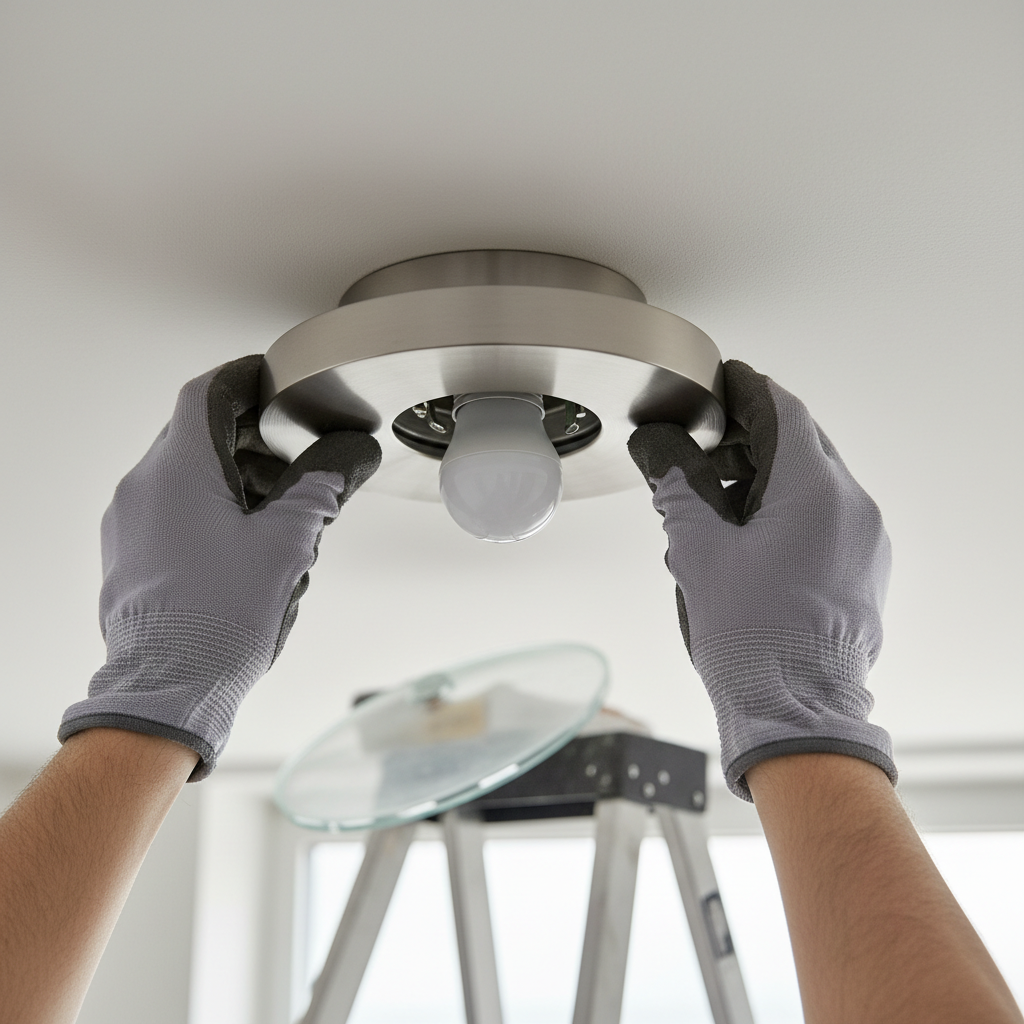
- Safety Protocol: De-energize the Circuit — Before touching any fixture, switch, or wiring, go to your home's electrical panel and switch the corresponding circuit breaker to the "OFF" position.
- Tool: Use a non-contact voltage tester on the switch and at the light fixture itself to confirm that the power is completely off. The tester should not light up or beep.
- Safety: If you are unsure which breaker controls the light, turn off the main breaker. This will cut power to the entire house but guarantees safety.
General remodeling · Renovation planning
| Project category | General remodeling |
|---|---|
| Problem type | Renovation planning |
| Trade required | General contracting |
| Urgency | Planned project |
| Safety risk | Low safety risk |
| DIY suitability | Pro recommended |
| Cost category | Major investment |
| Typical timeline | Design and permitting often 2–4 months before work starts |
| Contractor type | General contractor |
Repair option
Phase the work and fix the building envelope first.
Replacement option
Full renovation with permits, design, and a general contractor.
Common causes
- Space no longer fits how the household lives
- Resale preparation
- Deferred maintenance stacking up
Relevant tools:project cost estimatorcompare quoteshome improvement material prices
Published April 26, 2026Last updated August 17, 2026
Tools & materials you'll need
Affiliate linksAs an Amazon Associate FixlyGuide earns from qualifying purchases — at no extra cost to you. Prices and availability are accurate as of publication and subject to change.
How it works
Unlike incandescent bulbs, which create light by heating a wire filament until it glows, LED bulbs operate on the principle of electroluminescence. A semiconductor chip emits photons (light) when a specific, low-voltage direct current (DC) passes through it. Your home provides high-voltage (120V) alternating current (AC), which would instantly destroy an LED chip. This is why every LED bulb contains an essential and complex component: the driver.
The driver is a miniature power supply that converts the 120V AC from your home's wiring into the stable, low-voltage DC that the LED chips require. It performs three critical functions: rectifying the current from AC to DC, stepping the voltage down, and meticulously regulating the current to prevent over-powering the sensitive LEDs. This driver is a circuit board packed with electronic components like capacitors, resistors, transformers, and integrated circuits.
The vast majority of premature LED "burnouts" are not failures of the LED chips themselves, but failures of the driver circuitry. The electrolytic capacitors on the driver board are particularly susceptible to damage from two primary sources: excessive heat and unstable power. When a driver is subjected to voltage spikes, sags, or the "dirty" power from an incompatible dimmer switch, its components are stressed, leading to breakdown. Similarly, when heat cannot escape—as in an unventilated, enclosed fixture—it rapidly degrades the capacitors and other electronics on the driver board, causing the entire bulb to fail.
Step-by-Step Fix
This diagnostic process moves from the simplest to the most complex causes of premature LED bulb failure. Always prioritize safety; working with electricity is inherently dangerous.
-
Safety Protocol: De-energize the Circuit — Before touching any fixture, switch, or wiring, go to your home's electrical panel and switch the corresponding circuit breaker to the "OFF" position.
- Tool: Use a non-contact voltage tester on the switch and at the light fixture itself to confirm that the power is completely off. The tester should not light up or beep.
- Safety: If you are unsure which breaker controls the light, turn off the main breaker. This will cut power to the entire house but guarantees safety.
-
Test the Bulb in a Known-Good Location — Remove the supposedly "dead" LED bulb from the problematic fixture. Screw it into a simple, single-bulb table lamp that you know works correctly and is not connected to a dimmer.
- If the bulb works in the test lamp, the bulb is not the problem. The issue lies with the original fixture, its switch, or its wiring.
- If the bulb still does not work, it has genuinely failed. However, if this is a recurring problem in the same fixture, the fixture is likely causing the failures. Proceed with the following steps.
-
Inspect the Socket and Bulb Base — With the power off, closely examine the light socket. Look for black or brown scorch marks, white or green corrosive buildup, or rust. Check the metal contact tab at the very bottom of the socket.
- A flattened center tab may not make solid contact with the bulb's base. With the power off, use a small flathead screwdriver or needle-nose pliers to gently bend this tab upward by about 1/8 inch.
- Examine the base of the failed bulb. Any significant discoloration (yellowing or browning) on the plastic housing near the metal screw base is a clear sign of persistent, damaging heat buildup.
-
Confirm the Fixture's Wattage and Enclosure Rating — Look for a sticker on the fixture, usually inside the canopy or near the socket, that specifies its maximum wattage rating (e.g., "MAX 60W TYPE A"). While an LED uses less actual wattage, a fixture designed for the heat output of a 60W incandescent may have poor ventilation that traps the concentrated heat from an LED's driver.
- If the fixture is fully enclosed (e.g., a sealed glass globe, a "jelly jar" outdoor light, or an airtight recessed can), you must use an LED bulb specifically rated for "enclosed fixtures." This will be stated clearly on the bulb's packaging. Standard LEDs will overheat and fail rapidly in these applications.
-
Evaluate the Dimmer Switch — If the light fixture is controlled by a dimmer, it is a primary suspect. Old-style dimmers, designed for incandescent bulbs, are "leading-edge" or TRIAC dimmers. They work by chopping up the AC power wave, which is extremely stressful for an LED's driver.
- Diagnosis: Incompatible dimmers often cause LEDs to flicker, buzz, or fail to turn on or off completely.
- Solution: Replace the old switch with a modern dimmer designed for LEDs. Look for models marked "C/L," "LED+," or that specify "ELV" (Electronic Low Voltage) or "MLV" (Magnetic Low Voltage) compatibility. These provide a much cleaner power signal.
-
Tighten All Wiring Connections — With the power still off, use a screwdriver or hex driver to loosen the fasteners holding the light fixture's canopy to the ceiling. Carefully lower the fixture to expose the electrical box and wiring connections.
- Inspect the wire nuts connecting the house wiring to the fixture wiring. A loose connection, especially a loose neutral (white wire), can cause arcing, flickering, and voltage irregularities that destroy LED drivers.
- Gently tug on each wire entering a wire nut. If any come loose, undo the connection, twist the copper wires together neatly, and secure them with a new, correctly sized wire nut. Ensure no bare copper is exposed.
-
Identify Shared Circuit Loads — Consider what else is on the same electrical circuit as the failing light. If a major appliance with a large motor—such as a refrigerator, air conditioner, furnace, or a heavy-duty tool in a workshop—shares the circuit, its startup can cause a significant voltage sag.
- This repeated drop and surge in voltage is hard on sensitive electronics. You may notice the lights momentarily dimming when the appliance kicks on.
- The long-term solution is to have an electrician move the lighting to its own dedicated circuit, isolating it from the heavy motor load.
-
Test for "Rough Service" Conditions — Constant physical vibration can also lead to premature failure. While LEDs have no fragile filament, persistent shaking can fatigue the solder joints on the internal driver board, causing them to crack and fail.
- This is common in fixtures mounted to or near ceiling fans, garage door openers, laundry rooms with active machines, or near frequently slammed doors.
- For these locations, purchase "rough service" or "garage door" rated LED bulbs. These have a more robust internal construction and reinforced components designed to withstand vibration.
-
Measure the Line Voltage — This is a more advanced step for those comfortable using a multimeter. Set your multimeter to measure AC Voltage (V~ or VAC). With the power on, carefully touch the meter's probes to the hot (black) and neutral (white) wires at the switch, or directly to the contacts inside the light socket.
- Nominal voltage in the US is 120V. A healthy range is typically between 115V and 125V.
- If your reading is consistently above 125V–128V, you have an over-voltage condition. This will dramatically shorten the lifespan of not just LED bulbs, but all electronics in your home. This problem often originates with the utility provider and should be reported.
-
Install a High-Quality Bulb As a Final Test — After checking all other factors, purchase a single, high-quality LED bulb from a top-tier manufacturer (such as Cree, Philips, or GE). Ensure it is correctly rated for the fixture (e.g., dimmable, enclosed-rated). If this new, high-quality bulb also fails in an unusually short time, it strongly confirms a persistent, underlying electrical issue in that specific circuit that requires professional diagnosis.
Common mistakes
- ** mismatching Dimmers and Bulbs.** Many people buy a "dimmable" LED bulb but connect it to a 20-year-old dimmer switch designed for incandescents. Both the bulb and the switch must be rated as compatible with each other. The fix is to install a modern C/L-style dimmer.
- Using Standard LEDs in Enclosed Fixtures. Placing a standard A19 LED bulb inside a sealed overhead light fixture or a vapor-tight outdoor lamp is a common error. Heat becomes trapped, cooks the driver, and causes failure in months, not years. Always buy bulbs explicitly marked "Suitable for Enclosed Fixtures" for these applications.
- Overtightening the Bulb. Twisting a bulb into a socket with excessive force can damage the socket's brass contact tab, deform the bulb's own base, or, in a worst-case scenario, break the delicate solder points connecting the base to the internal driver board. Screw the bulb in until it feels snug and lights up, then stop.
- Ignoring the Root Cause. When a bulb dies, the first instinct is to blame the bulb and buy a different brand. If the replacement also dies quickly in the same socket, stop buying bulbs. The problem is almost certainly with the fixture, switch, or circuit. Continuing to replace bulbs without investigating is a waste of money.
- Bending a Live Socket Tab. Trying to adjust the small brass contact tab at the bottom of a light socket to improve the connection without first turning off the power at the circuit breaker is extremely dangerous. This action can cause a direct short, an arc flash, and severe electrical shock.
Cost & time breakdown
The cost and time involved in fixing chronic LED burnout vary widely, from a simple bulb swap to a professional electrical repair.
| Task | DIY cost | Pro cost | Time |
|---|---|---|---|
| Replace Bulb with Correct Specialty Type | $8 - $25 per bulb | N/A | < 5 minutes |
| Replace Incompatible Dimmer Switch | $25 - $60 for switch | $150 - $300 | 30-60 minutes |
| Tighten Loose Electrical Connections in Fixture | $1 - $5 for new wire nuts | $100 - $250 (service call) | 30-45 minutes |
| Replace a Standard Light Fixture | $50 - $300+ for fixture | $150 - $400 (incl. labor) | 1-2 hours |
| Measure Line Voltage and Diagnose Circuit | $20 - $50 for a multimeter | $100 - $250 (diagnostic fee) | 15-30 minutes |
| Install Whole-Home Surge Protector | Not a typical DIY project | $400 - $800+ | 2-4 hours |
When to call a pro
While many causes of LED failure are simple DIY fixes, certain signs indicate a more serious problem that requires a licensed electrician.
Call a professional immediately if you discover evidence of arcing or melting, such as significant soot marks around connections or melted plastic on wires or devices. This signals a dangerous fault that can lead to a fire. If multiple lights on different circuits are flickering or burning out bulbs, it could indicate a systemic issue like a failing neutral connection in your main electrical panel, which is a serious hazard. If you use a multimeter and find consistently high voltage (above 125V), this is a problem for both an electrician and your utility company to investigate. Finally, if you have gone through all the DIY troubleshooting steps and the problem persists, an electrician can use advanced tools like a power quality analyzer to detect subtle issues like harmonic distortion or frequency noise that are invisible to a standard multimeter but destructive to LED drivers. Never hesitate to call a pro if you are not 100% confident and comfortable working with live electrical systems.
Prevention & maintenance
- Buy High-Quality Bulbs. Invest in LEDs from reputable, long-standing manufacturers. While more expensive upfront, their drivers use superior components (like higher-temperature-rated capacitors) that are more resilient to heat and power fluctuations, leading to a much longer service life.
- Match the Bulb to the Application. Before purchasing, read the package specifications carefully. If the fixture is enclosed, buy an enclosed-rated bulb. If it is on a dimmer, buy a dimmable bulb and ensure the dimmer is a compatible C/L model. For a garage door opener, use a vibration-resistant bulb.
- Install a Whole-Home Surge Protector. The most robust defense against power quality issues from the grid is a Type 1 or Type 2 surge protective device (SPD) installed at your main electrical panel. This protects all sensitive electronics in your home, including LED drivers, from damaging transient voltages.
- Periodically Clean Fixtures. Dust and grime, especially on the heat sink fins of an LED bulb or the trim of a recessed light, can act as an insulator. Once a year, wipe down fixtures and bulbs (when cool) to allow them to dissipate heat effectively.
- Check for Loose Connections. When you are changing a bulb in a fixture that is prone to vibration, like a ceiling fan, give the fixture a gentle wiggle. If it feels loose, schedule time to turn off the power and check the mounting bracket and wire connections in the junction box.
- Upgrade Dimmers During Renovation. If you are painting or updating a room, it's the perfect time to proactively replace any old rotary or slider dimmers with modern, LED-compatible versions. This prevents future problems before they start.
Related Articles
Keep troubleshooting with these hand-picked guides from FixlyGuide:
- The 3 Hidden Reasons Your LED Bulbs Die Early (And the Simple Fixes) — LED bulbs promise long life, but often fail prematurely due to hidden electrical issues or incompatible fixtures. Learn the real culprits.
- The Tiny Gap Behind Your Baseboards That Costs You $100s in Drafts — Discover why your baseboards are pulling away from the wall and the simple, inexpensive fixes that can seal drafts and improve your home's…
- One Shower, No Hot Water? The Hidden Mixing Valve Trick Plumbers Use — Discover why only one shower in your home might lack hot water and the simple internal fix for a common mixing valve issue, saving you a pl…
- The $30 Secret to Banishing Ice Dams Without Damaging Your Roof — Discover how a simple, inexpensive trick can safely eliminate dangerous ice dams from your roof and prevent costly damage to your home.
- The #1 Mistake Homeowners Make When Diagnosing Low Water Pressure (It's Not Your Pipes!) — Discover the most overlooked culprit behind low water pressure throughout your entire house and learn how to fix it with simple steps.
- AC Blowing Warm Air? Easy Fixes for Common AC Problems — Discover the most common reasons your AC is blowing warm air and learn simple, actionable steps to troubleshoot and fix the issue yourself,…
What should this project cost?
Enter your project details for a realistic cost range before you call anyone.
Cost depends heavily on which system turns out to be the source.
- Regional adjustment
- National average
- Labor share (typical)
- ~$1,620
- Quotes to collect
- 3 written estimates
Educational estimate based on national averages — not a binding quote. Always confirm with written local estimates.
Get the print-ready PDF of this guide
A clean, ad-free, printable version you can keep on your phone or pin to the workshop wall. Free with a FixlyGuide account.
- Print-optimized layout
- Tools, materials & every step included
- Saved to your account
Recommended for DIYers & woodworkers
Sponsored
The Top 20 Tools for Workshops of Any Budget
No stationary machines or power tools required — plus 3 fundamental tools that can't be bought at any price.
Get the free guide
Ted's Woodworking — The #1 Woodworking Resource
Detailed instructions, dimensioned drawings, materials & cutting lists, and 3D schematics for every skill level.
See the plansSponsored: links above are affiliate links. FixlyGuide may earn a commission on qualifying purchases — at no extra cost to you.
Frequently asked questions
Why do my LED bulbs keep burning out quickly?+
LED bulbs typically fail prematurely due to factors beyond the bulb itself, such as voltage fluctuations, incompatible dimmer switches, loose wiring connections in the fixture, or excessive heat buildup from enclosed fixtures.


Discussion
Loading comments…