- The 4 Critical Dimensions of a Bluebird House (Most DIYers Miss One) — Discover the four often-overlooked dimensions crucial for a successful bluebird house, ensuring your avian residents thrive season after se…
- The Secret to Lush Raised Beds? It's Not Just About How You Water — Smart irrigation for raised garden beds isn't just about automation; it's about delivering the right amount of water precisely when your pl…
- The 6-Minute Secret to a Sparkling Bathroom (It’s Not What You Think) — Unleash the hidden power of your cordless drill to tackle stubborn household grime, from tile grout to dryer vents, with specialized attach…
- The 5 Essential Tools Every New Gardener Needs (And 3 You Can Skip) — Starting a garden doesn't require a huge investment in tools; savvy new gardeners can thrive with just a few key items and save money by kn…
- The 4 Common Hummingbird Food Mistakes (And How to Make Nectar They'll Love) — Avoid common pitfalls when making hummingbird food to ensure a healthy and attractive treat for your backyard visitors.
Published May 13, 2026Last updated August 17, 2026
Tools & materials you'll need
Affiliate linksAs an Amazon Associate FixlyGuide earns from qualifying purchases — at no extra cost to you. Prices and availability are accurate as of publication and subject to change.
Quick Answer
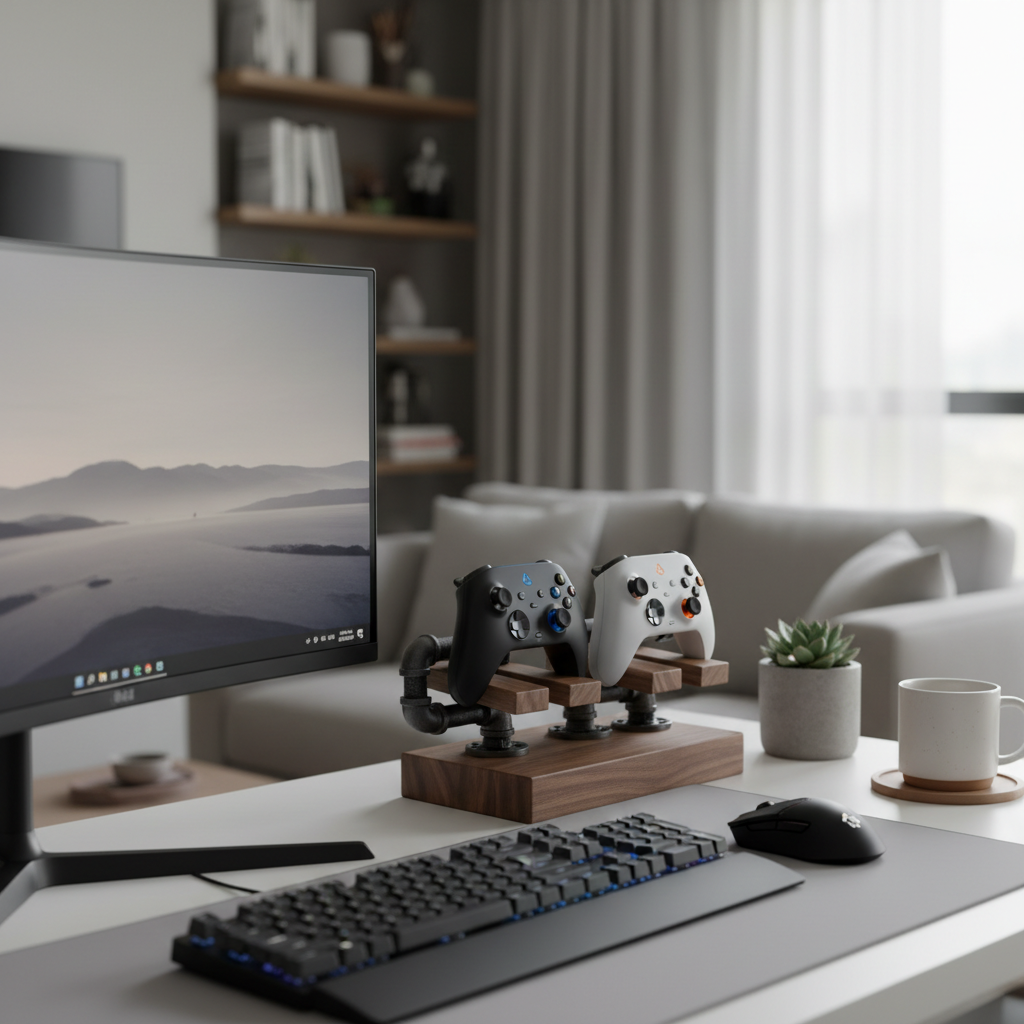
A Tired of tripping over controllers or hunting for them amidst a pile of games and remotes? A custom-built gaming controller stand offers an elegant and practical solution. By combining a few pieces of wood and standard pipe fittings, you can create a dedicated, attractive home for your controllers, keeping your gaming setup organized and your gear protected, all while adding a touch of personalized flair to your space. The entire project can be completed in an afternoon with basic tools and materials typically costing less than $15.
The Problem
For many homeowners, the living room or dedicated gaming space often becomes a battlefield of misplaced controllers, tangled charging cables, and general electronic clutter. This isn't just an aesthetic issue; it can lead to frustration when trying to find a specific controller, damage to expensive equipment from drops or spills, and a less enjoyable gaming experience. The sleek designs of modern gaming consoles and TVs are often overshadowed by the chaotic disarray of accessories, making the entire area feel uninviting and messy. Even worse, leaving controllers on the floor or precariously balanced on furniture increases the risk of accidental damage, shortening their lifespan and leading to costly replacements. This project addresses the core problem of organization and protection for your valuable gaming peripherals.
How It Works
At its heart, a controller stand works by providing a stable, dedicated resting place for your gaming controllers. The design we'll be exploring leverages the inherent stability of a flat wooden base combined with the structural rigidity of pipe fittings. Imagine a mini-pedestal for each controller. The wooden base provides a solid foundation, preventing the stand from tipping over, while the pipe fittings, typically galvanized or black iron, create the vertical supports and arms that cradle the controllers securely. The weight and broadness of the base are critical; a wider and heavier base offers greater stability, especially when supporting multiple controllers or heavier models. Often, the connection points between the wood and pipe are made using flanges, which are flat, circular plates with screw holes that attach firmly to the wood, and a threaded center opening to accept the pipe. The pipes themselves are then assembled with elbows and tees to create the desired shape and number of controller slots. The beauty of using pipe fittings lies in their modularity and strength—you can easily customize the height, width, and number of holders by simply adding or subtracting different pipe segments and connectors. This simple mechanical advantage creates a robust and reliable system for organized controller storage, keeping them elevated, protected, and ready for your next gaming session.
Step-by-Step Fix
1. Gather Your Materials — Acquire all necessary wood and pipe fittings before beginning.
This ensures you have everything on hand and avoid interruptions during the build. Check your workshop for scrap wood first; many small projects like this can utilize leftover pieces.
- Tip: Lay out all your components to visualize the final assembly and confirm you have all the pieces.
2. Cut the Wooden Base — Size your base appropriately for the number of controllers.
Using a miter saw or handsaw, cut your chosen wood (walnut, ash, oak, or even a sturdy plywood) to the desired dimensions for the base. A common size for two controllers might be 10–12 inches long and 4–6 inches wide. Sand all edges smooth to prevent splinters and create a finished look.
- Safety Note: Always wear eye protection when cutting or sanding wood. Use clamps to secure the wood safely before cutting.
3. Mark Flange Placement — Precisely locate where the pipe flanges will attach.
Place your pipe flanges on the wooden base where you intend the controller supports to rise. Use a pencil to mark the screw holes. Ensure the flanges are positioned to provide stable support for your controllers without a risk of tipping. For multiple controllers, space the flanges evenly. If you add felt pads to the bottom of the base, apply them now to avoid scratching surfaces.
4. Attach the Flanges — Securely fasten the flanges to the wooden base.
Using wood screws appropriate for the thickness of your base, screw the flanges firmly into the marked positions. Use a drill with a driver bit. Do not overtighten, as this can strip the wood. Ensure the flanges are flush with the wood surface.
- If this doesn't work: If screws are not holding, drill pilot holes slightly smaller than the screws before driving them in. If the wood is too soft, consider using slightly longer screws or a different wood type.
5. Assemble the Lower Pipes — Begin building the vertical support structure.
Thread short sections of pipe (e.g., 2–3 inches) into the flanges. Hand-tighten these securely. These will be the initial vertical risers from the base.
6. Add Elbows and Tees — Create the horizontal controller arms.
Attach 90-degree elbows to the top of the initial vertical pipes. If you're building a stand for a single controller, an elbow might suffice. For multiple, you'll likely use a T-fitting to create a central arm, then add elbows and horizontal pipe sections for each controller cradle.
- Tool Tip: A pipe wrench can help tighten connections for a more rigid assembly, but avoid over-tightening which can damage threads. A snug hand-tightening is often sufficient for this application.
7. Insert Horizontal Supports — Determine the ideal length for controller support.
Measure your controllers to find the optimal length for the horizontal pipe sections that will cradle them. Cut these pipes if necessary (though often pre-cut nipples in various lengths are available). Thread these horizontal sections into the elbows or tees. These should be long enough to support the controller comfortably without interfering with buttons or joysticks.
8. Finish with Caps or Plugs — Give your stand a clean, safe finish.
Cap off any open pipe ends with threaded caps or plugs. This prevents sharp edges and gives the stand a finished, professional look. You can also add rubber or felt pieces to the cradling pipes to prevent scratching your controllers.
9. Apply Finish (Optional) — Protect and enhance the wood and metal.
If desired, sand the wood base again with finer grit sandpaper (220-grit) and apply a wood stain or clear coat (polyurethane, lacquer, or wax) to protect the wood and enhance its grain. For the metal pipes, you can leave them natural, or clean and clear-coat them to prevent rust, or even paint them to match your gaming setup.
- Drying Time: Allow ample drying time for any finishes before placing controllers on the stand, usually 24-48 hours.
Common Causes
The primary
Related Articles
Keep troubleshooting with these hand-picked guides from FixlyGuide:
- The 4 Critical Dimensions of a Bluebird House (Most DIYers Miss One) — Discover the four often-overlooked dimensions crucial for a successful bluebird house, ensuring your avian residents thrive season after se…
- The Secret to Lush Raised Beds? It's Not Just About How You Water — Smart irrigation for raised garden beds isn't just about automation; it's about delivering the right amount of water precisely when your pl…
- The 6-Minute Secret to a Sparkling Bathroom (It’s Not What You Think) — Unleash the hidden power of your cordless drill to tackle stubborn household grime, from tile grout to dryer vents, with specialized attach…
- The 5 Essential Tools Every New Gardener Needs (And 3 You Can Skip) — Starting a garden doesn't require a huge investment in tools; savvy new gardeners can thrive with just a few key items and save money by kn…
- The 4 Common Hummingbird Food Mistakes (And How to Make Nectar They'll Love) — Avoid common pitfalls when making hummingbird food to ensure a healthy and attractive treat for your backyard visitors.
- The #1 Mistake Homeowners Make Installing Floating Shelves (and How to Fix It) — Discover the most common error DIYers make when mounting floating shelves into drywall and how to ensure your shelves are sturdy and secure.
Should you do this yourself?
Answer five quick questions before you start. Safety outranks savings every time.
Your experience with work like this
How high do you have to work?
Does the job involve any of these?
Will it need a permit?
Specialty tools
Free and instant. Educational guidance only — not a quote, inspection, or professional diagnosis.
What should this project cost?
Enter your project details for a realistic cost range before you call anyone.
Common repairs run $150–$650; repipes and water-heater replacements reach $1,500–$4,500.
- Regional adjustment
- National average
- Labor share (typical)
- ~$754
- Quotes to collect
- 3 written estimates
Educational estimate based on national averages — not a binding quote. Always confirm with written local estimates.
Before you start
Check the difficulty, permits, and safety risk — then decide whether to call a pro.
- Estimate this projectGet a cost range for your scope and ZIP before you call anyone.Open
- Get local estimatesSend one request and compare written estimates from vetted pros.Open
Free, no signup required. Estimates are educational guidance, not a quote or an inspection.
This article was independently written by FixlyGuide based on the source topic.
Frequently asked questions
How much does it cost to build a DIY controller stand?+
Most DIY controller stands using wood and pipe fittings can be built for $10-$25, depending on the type of wood and pipe you use. Scrap wood can bring the cost down significantly.
What tools do I need for this project?+
Basic tools like a saw (hand saw or miter saw), drill, sandpaper, and possibly a pipe wrench are all you need. No specialized equipment is required.
Can I customize the stand for different controllers?+
Absolutely! The modular nature of pipe fittings allows you to easily adjust the height, width, and number of cradles to fit any type of gaming controller, from old-school to next-gen.
How long does it take to build a controller stand?+
The active construction time is typically 30-60 minutes. If you include drying time for finishes (stain, paint), the total project might take 1-2 days, but the hands-on work is quick.


Discussion
Loading comments…