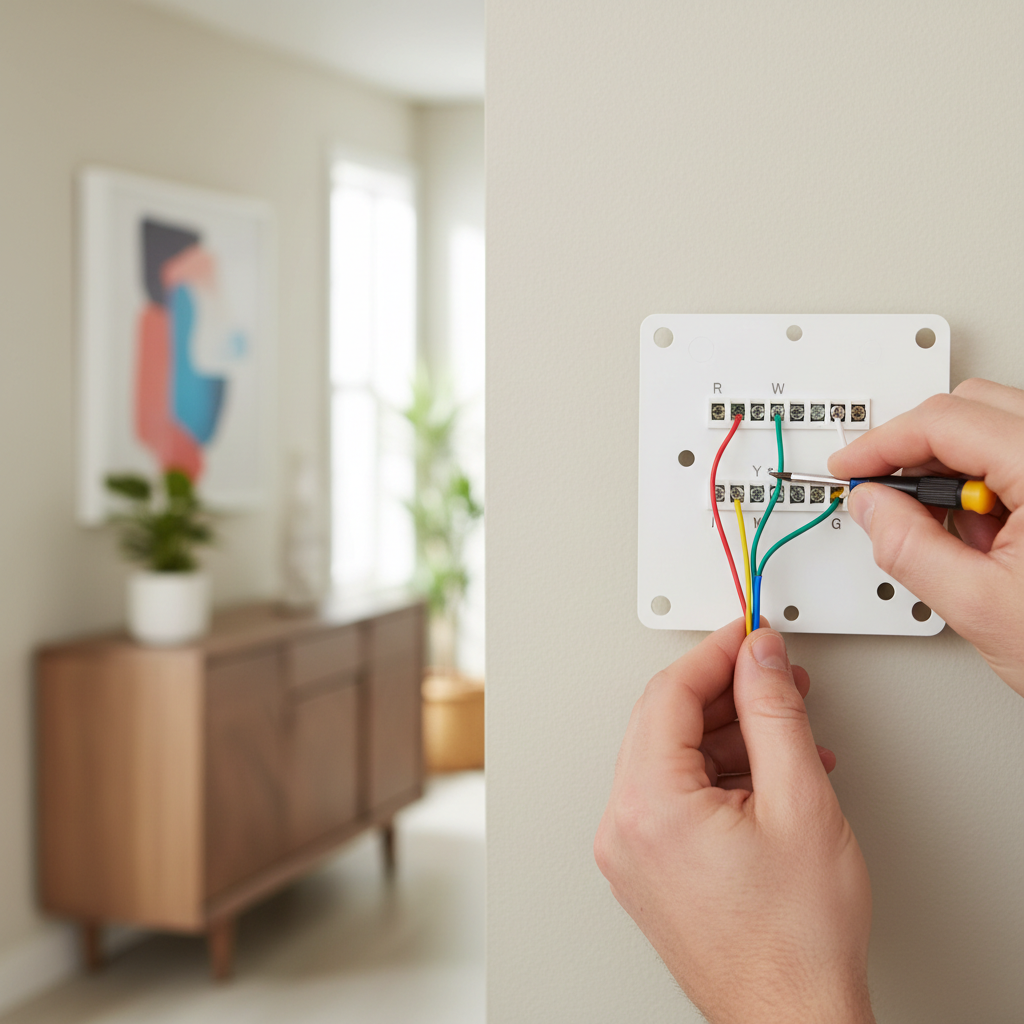
- Carefully remove your old thermostat from the wall plate. You'll likely see a bundle of wires connected to terminals.
- Look for a wire connected to a terminal labeled 'C' or 'Common'. If you see one, you're likely in luck! Note its color, usually blue or black, but it can vary.
- If you find a C-wire: Great! Proceed to connect it to the 'C' terminal on your new smart thermostat. Ensure the wire is stripped about 3/8 inch and securely fastened. Then, re-enable power and test.
- If you find an unused wire: This is your next best option. Note its color. You'll need to go to your furnace/air handler next.
HVAC · High energy usage
| Project category | HVAC |
|---|---|
| Problem type | High energy usage |
| Trade required | HVAC |
| Urgency | Planned project |
| Safety risk | Low safety risk |
| DIY suitability | DIY for experienced homeowners |
| Cost category | High cost |
| Typical timeline | Assessment within weeks; replacement planned off-season |
| Contractor type | Licensed HVAC technician |
Repair option
Duct sealing, insulation, and a tune-up before touching the equipment.
Replacement option
High-efficiency replacement sized by a load calculation, not a rule of thumb.
Common causes
- Aging, low-efficiency equipment
- Leaking ducts losing conditioned air
- Insufficient attic insulation
- Oversized system short-cycling
Relevant tools:project cost estimatorrepair or replace
Published May 21, 2026Last updated August 18, 2026
Tools & materials you'll need
Affiliate linksAs an Amazon Associate FixlyGuide earns from qualifying purchases — at no extra cost to you. Prices and availability are accurate as of publication and subject to change.
Quick Answer
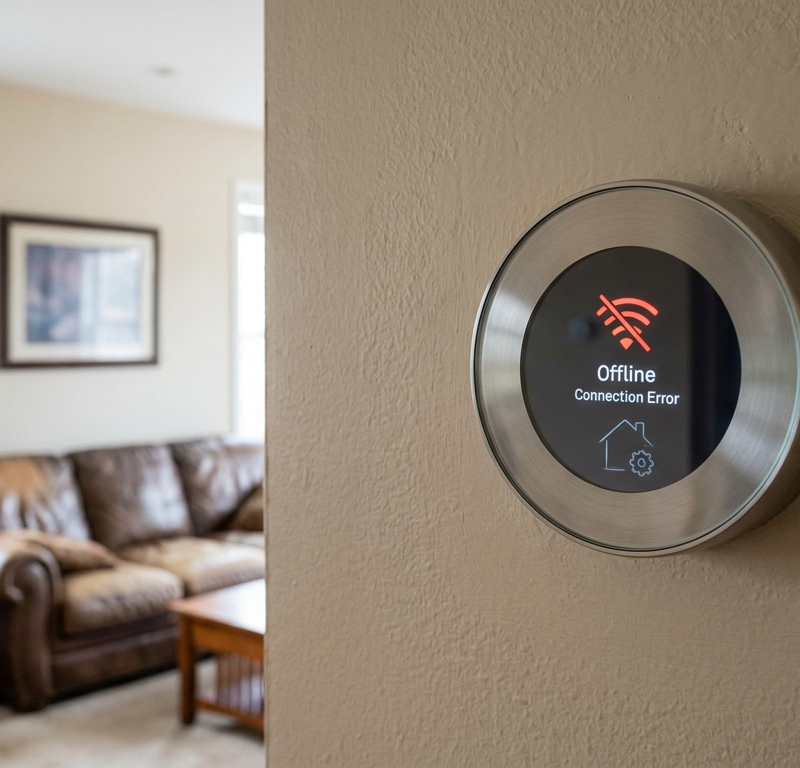
The most frequent stumbling block when homeowners try to install a smart thermostat themselves is the absence of a 'C-wire' (common wire) in their existing HVAC wiring. Many older homes lack this dedicated wire, which is essential for providing continuous 24V AC power to smart thermostats. Without it, the new thermostat won't power on, will flicker, struggle to maintain a Wi-Fi connection, or rapidly deplete its internal battery. The solution often involves identifying an unused wire to re-purpose as a C-wire, installing a C-wire adapter, or, in some cases, running a new wire.
The Problem
You've unboxed your sleek new smart thermostat, eager to take control of your home's climate from your phone. You've removed the old thermostat, meticulously labeled the wires, and connected everything according to the new device's instructions. But then, disappointment: nothing happens. The screen is blank, or it flickers erratically. Perhaps it powers on briefly before dying, or it constantly complains about low battery, even though it's supposed to be wired. This common frustration almost always points to an insufficient power supply, specifically the lack of a C-wire.
Traditional thermostats, especially older mechanical or battery-powered digital models, often only require two wires (R and W for heating, or R and Y for cooling) to operate. These systems 'borrow' power from the HVAC transformer during heating or cooling cycles, or rely entirely on batteries for their low-power display. Smart thermostats, with their Wi-Fi radios, color screens, and advanced sensors, demand a constant, dedicated 24VAC power supply. This is precisely what the C-wire provides. Without it, the thermostat tries to 'power steal,' drawing trickle current through other wires, which can lead to erratic behavior, damage to your HVAC system's control board, or simply a dead thermostat.
How It Works
Your HVAC system operates on a low-voltage (typically 24-volt AC) control circuit. At the heart of this circuit is a transformer, usually located within your furnace or air handler, which steps down the standard 120V or 240V household current. This transformer has two main terminals: 'R' (Red, for 24V Hot) and 'C' (Common, for 24V Neutral).
When your old thermostat called for heat, it essentially completed a circuit between the R wire and the W (White, heat) wire. When it called for cool, it completed a circuit between R and Y (Yellow, cool), often also engaging G (Green, fan). This allows a small amount of current to flow, signaling the furnace or AC compressor to turn on. The thermostat itself usually drew its power from these intermittent connections, or relied on internal batteries.
Smart thermostats, however, are essentially miniature computers. They need continuous power to run their processors, maintain a Wi-Fi connection, illuminate their displays, and operate sensors, even when the heating or cooling system isn't actively running. The C-wire provides this constant return path to the transformer, completing the low-voltage circuit and ensuring a steady supply of 24VAC power without interfering with the signaling wires. Think of the R wire as the 'live' wire and the C-wire as the 'neutral' wire in a standard household electrical circuit, but for your thermostat's brain. Without the C-wire, the smart thermostat attempts to draw power by creating a tiny voltage drop across the signaling wires, which can cause erratic HVAC behavior or simply fail to provide enough juice for the device to function properly.
Step-by-Step Fix
1. Safety First — Always Turn Off Power
- Before touching any wiring, go to your electrical service panel and locate the breaker that controls your furnace or air handler. Flip it to the OFF position. If there's a disconnect switch near the unit, turn that off too. Verify power is off by trying to turn on your HVAC system from your old thermostat (if it's still connected) or by checking the furnace fan doesn't respond.
- Safety Note: Working with electrical wiring, even low-voltage, carries risks. Always ensure power is completely off before proceeding. Failure to do so can result in electrical shock or damage to your HVAC system's control board.
2. Check Your Existing Thermostat Wiring for a C-Wire — Uncover Hidden Wires
- Carefully remove your old thermostat from the wall plate. You'll likely see a bundle of wires connected to terminals.
- Look for a wire connected to a terminal labeled 'C' or 'Common'. If you see one, you're likely in luck! Note its color, usually blue or black, but it can vary.
- Even if there's no wire on the 'C' terminal, gently pull the wire bundle a few inches out of the wall. Sometimes, an unused (and often capped off) wire is tucked inside the wall, ready to be utilized. This is a common scenario in homes built within the last 30-40 years that might have been pre-wired for future upgrades.
- If you find a C-wire: Great! Proceed to connect it to the 'C' terminal on your new smart thermostat. Ensure the wire is stripped about 3/8 inch and securely fastened. Then, re-enable power and test.
- If you find an unused wire: This is your next best option. Note its color. You'll need to go to your furnace/air handler next.
3. Locate Your HVAC Control Board — Identify the C-terminal
- Head to your furnace or air handler. You'll need to remove the access panel (usually held by screws or clips). Look inside for the control board – it's typically a circuit board with multiple low-voltage wires connected to it.
- Safety Note: Be extremely careful around the furnace. Some internal components can be sharp. Do NOT touch any high-voltage wiring (thicker, insulated wires, often in wire nuts or conduit) and avoid gas lines if applicable.
- Find the terminal block on the control board. You should see terminals labeled 'R', 'C', 'W', 'Y', 'G', etc. Identify the 'C' terminal.
- If you found an unused wire at the thermostat: Find the corresponding color wire in the bundle coming from the thermostat at the furnace control board. Gently strip the end of this unused wire (if it's not already stripped) and connect it securely to the 'C' terminal on the control board. Make sure the connection is firm.
- If there's no corresponding unused wire OR the C-terminal is already in use by another device (like a humidifier): You'll need to consider a C-wire adapter or running a new wire.
4. Install a C-Wire Adapter (If No C-Wire Available) — A Common Solution
- Many smart thermostat manufacturers (like ecobee, Nest, Honeywell) offer C-wire adapter kits if your home lacks a C-wire. These kits typically involve a small module that splits the power from the G (fan) wire or another existing wire to create a C-wire.
- Follow the specific instructions provided with your adapter kit. Generally, this involves connecting the adapter at the furnace control board, routing its wires, and sometimes making adjustments at the thermostat location.
- Important: Ensure your specific smart thermostat is compatible with the adapter you choose. Some adapters are universal, while others are brand-specific.
- If this doesn't work: Double-check all connections, ensuring wires are seated firmly. Confirm the adapter is installed correctly according to its instructions. Reset your breaker and try again.
5. Wiring and Testing Your Smart Thermostat — Final Connections
- Connect all the wires from your wall to the appropriate terminals on your new smart thermostat's backplate. Always refer to the thermostat's specific wiring diagram. Ensure the C-wire (whether native, repurposed, or from an adapter) is connected to the 'C' terminal.
- Mount the thermostat onto its backplate.
- Go back to your electrical panel and turn the power back ON to your furnace/air handler.
- Your smart thermostat should now power on. Follow the on-screen prompts for initial setup (Wi-Fi connection, HVAC system type, scheduling).
- Test all functions: Manually call for heat, then cool, then turn the fan on independently. Listen to ensure your furnace, AC, and fan are responding correctly.
- Troubleshooting: If it still doesn't power on, immediately turn off the power at the breaker. Recheck all connections at both the thermostat and the furnace control board. Ensure there are no loose wires or shorts. Sometimes, a wire might not be stripped enough, or it might be pushed into the terminal without making good contact.
Common Causes
- Older Home Construction: Homes built before the 1980s or 1990s often had simpler HVAC systems that didn't require a dedicated C-wire, as traditional thermostats could 'power steal' or run on batteries.
- Basic Thermostat Installation: Even in newer homes, if a very basic, non-programmable thermostat was originally installed, the installer might have only run the minimum number of wires needed, leaving the C-wire capability unused.
- Unused Wire Present but Not Connected: A common scenario where a C-wire equivalent is present in the wall bundle but simply wasn't connected at either the thermostat or the furnace control board during the initial installation.
- HVAC System Configuration: Some multi-zone or zoned HVAC systems might use C-wires differently or have specific wiring requirements that complicate a direct swap.
- Incorrect Identifying of Wires: Accidentally connecting R to Y instead of R to C can cause issues.
Common Mistakes
- Skipping the Power Shut-Off: Never work with thermostat wiring without turning off the power at the breaker. This is paramount for safety and to prevent short-circuiting your HVAC system's control board, which is an expensive repair.
- Assuming All Wires Are Active: Not all wires in a thermostat bundle are necessarily connected or active. Always verify continuity or trace wires between the thermostat and the furnace control board if unsure.
- Ignoring Unused Wires: Many homeowners overlook the possibility of an unused wire tucked into the wall behind the old thermostat or at the furnace. Always check for these before resorting to an adapter.
- Not Labeling Wires Correctly: Rushing the removal of the old thermostat without clearly labeling each wire before disconnecting it can lead to confusion and incorrect wiring of the new device. Use the provided labels or masking tape.
- Improper Wire Stripping: Wires that are stripped too long risk shorting out, while wires stripped too short won't make good contact in the terminals. Aim for about 3/8 to 1/2 inch of exposed copper.
- Pushing Wires in Without Checking Connection: Just because a wire is in the terminal doesn't mean it's making good contact. Give each wire a gentle tug after inserting to ensure it's firmly seated.
Cost & Time Breakdown
| Task | DIY Cost | Pro Cost | Time |
|---|---|---|---|
| C-wire Adapter Kit | $20–$50 | Included | 30–60 mins |
| Repurposing Unused Wire | $0 | Included | 20–40 mins |
| Running New C-Wire (exposed) | $10–$30 | $100–$250 | 1–2 hours |
| Running New C-Wire (in-wall) | $50–$100 | $200–$500 | 2–4 hours |
| Troubleshooting/Diagnosis | $0 | $75–$150 | 30–60 mins |
| Smart Thermostat (device) | $100–$250 | $150–$350 | N/A |
Tips & Prevention
- Research Before You Buy: Before purchasing a smart thermostat, check your existing thermostat's wiring. Snap a picture of the wires connected to the terminals. Most smart thermostat manufacturers have compatibility checkers on their websites.
- Look for a C-Wire at Purchase: When buying, explicitly look for smart thermostats that state they do NOT require a C-wire (they often come with an adapter or use batteries more efficiently) if you suspect you don't have one.
- Photograph Your Wiring: Take clear, well-lit photos of your old thermostat's wiring BEFORE you disconnect anything. These photos can be invaluable if you get confused.
- Consult Your HVAC Manual: If you have it, check your furnace or air handler's manual for wiring diagrams. This can help you confidently identify the C-terminal.
- Use Good Quality Tools: A decent wire stripper and small screwdriver set will make the job much easier and reduce the risk of damaging wires or terminals.
- Test Immediately: Don't wait to test your new thermostat. Go through all heating, cooling, and fan functions to ensure everything is working as expected.
When to Call a Professional
While installing a smart thermostat is a common DIY project, there are specific situations where calling a licensed HVAC technician is prudent. If you've opened your furnace panel and are unsure about identifying the control board or the C-terminal, or if you locate high-voltage components that make you uncomfortable, stop and call a pro. Similarly, if your HVAC system is complex (e.g., multi-stage heating/cooling, heat pump with auxiliary heat, zoned systems, or proprietary communication systems), wiring mistakes can lead to costly damage. If you've tried installing a C-wire adapter and the thermostat still won't power on or you're experiencing intermittent issues with your HVAC system after installation, a professional can diagnose underlying electrical problems or ensure the thermostat is correctly integrated without causing damage to your valuable heating and cooling equipment.
Related Articles
Keep troubleshooting with these hand-picked guides from FixlyGuide:
- The #1 Mistake Homeowners Make Installing a Smart Thermostat (and How to Fix It) — Avoid the most common pitfall when installing a smart thermostat yourself and ensure a smooth, energy-efficient setup.
- The #1 Reason Your AC Fan Won't Spin (And the 20-Minute Fix) — Diagnose and fix a non-spinning AC condenser fan with our step-by-step guide, saving you money and restoring your home's cool air.
- The #1 Reason Your AC Blows Warm Air (And It's Not What You Think) — A dirty air filter is often the overlooked culprit behind an air conditioner blowing warm air, hindering its ability to cool your home effi…
- The #1 Dryer Heating Culprit Homeowners Miss (And the Cheap Fix) — Your dryer's not heating? Often, the culprit is a hidden component that's easy and inexpensive to replace if you know where to look.
- That Musty Smell When Your Bathroom Fan Runs? Here’s Why. — A musty odor from your bathroom fan isn't just unpleasant; it's a red flag for moisture and mold buildup within the fan housing, motor, or…
- The #1 Mistake Homeowners Make When Their AC Drain Clogs (And The $5 Fix) — Discover the most common error homeowners make when tackling a clogged AC drain line and learn a simple, inexpensive solution to prevent co…
Should you do this yourself?
Answer five quick questions before you start. Safety outranks savings every time.
Your experience with work like this
How high do you have to work?
Does the job involve any of these?
Will it need a permit?
Specialty tools
Free and instant. Educational guidance only — not a quote, inspection, or professional diagnosis.
Estimate your own project cost
National averages are a starting point. Enter your details for a range that fits your house.
HVAC replacement cost
- Equipment$2,200 – $3,800
- Installation labor$1,200 – $2,500
Always insist on a Manual J load calculation — sq-ft sizing is only a rough check. Federal heat-pump rebates may reduce cost significantly.
Educational estimate only — always confirm with written local bids.
What should this project cost?
Enter your project details for a realistic cost range before you call anyone.
Service calls and common repairs run $150–$900; full system replacement typically $6,000–$12,000.
- Regional adjustment
- National average
- Labor share (typical)
- ~$1,935
- Quotes to collect
- 3 written estimates
Educational estimate based on national averages — not a binding quote. Always confirm with written local estimates.
Fixly Project Decision Box
- DIY difficulty
- Advanced
- Estimated time
- Homeowner checks 20–30 minutes
- Cost level
- Moderate
Main tools / materials
- Clean air filter
- Garden hose for condenser coils
- Shop vac for the condensate line
When to stop and call a pro
- Burning smell, smoke, or a tripping breaker
- Refrigerant lines iced over or hissing
- Any work inside the sealed refrigerant circuit (EPA-licensed only)
- Gas smell near a furnace — leave and call the utility
Need professional help?
Find an HVAC Pro Near YouBefore you start
Check the difficulty, permits, and safety risk — then decide whether to call a pro.
Free, no signup required. Estimates are educational guidance, not a quote or an inspection.
Frequently asked questions
What is a C-wire and why is it important for smart thermostats?+
The C-wire (common wire) provides a continuous 24VAC power supply to your smart thermostat. Unlike older thermostats that could 'power steal' or run on batteries, smart thermostats need constant power for Wi-Fi, displays, and advanced features. Without it, the thermostat may not power on, flicker, or have battery issues.
Can I install a smart thermostat without a C-wire?+
It depends on the smart thermostat model. Some are designed to work without a C-wire and rely on batteries or more aggressive power-stealing techniques (which can sometimes cause HVAC issues). However, most popular smart thermostats require a C-wire for optimal performance. If you don't have one, you can often use an adapter or repurpose an unused wire.
How do I know if my home has an existing C-wire?+
The easiest way is to remove your old thermostat's faceplate and look for a wire connected to a terminal labeled 'C' or 'Common'. Even if no wire is connected there, gently pull the wire bundle out of the wall; sometimes, an unused blue or black wire is tucked inside. You can also check your furnace control board for a 'C' terminal connection.
What if there are extra wires in the wall but nothing connected to 'C'?+
If you find an unused wire (often blue or black) tucked inside the wall at the thermostat location, you can often use it as a C-wire. You'll need to go to your furnace or air handler, find the corresponding wire in the bundle, and connect it to the 'C' terminal on the control board. Then, connect it to the 'C' terminal at your new thermostat.
What is a C-wire adapter and how does it work?+
A C-wire adapter is a device that allows a smart thermostat to get continuous power even if your home lacks a dedicated C-wire. It typically works by drawing power from an existing wire, often the G (fan) wire, and then splitting it to provide the necessary common connection to the thermostat without affecting the fan's operation. It usually connects at the furnace control board.
Discussion
Loading comments…