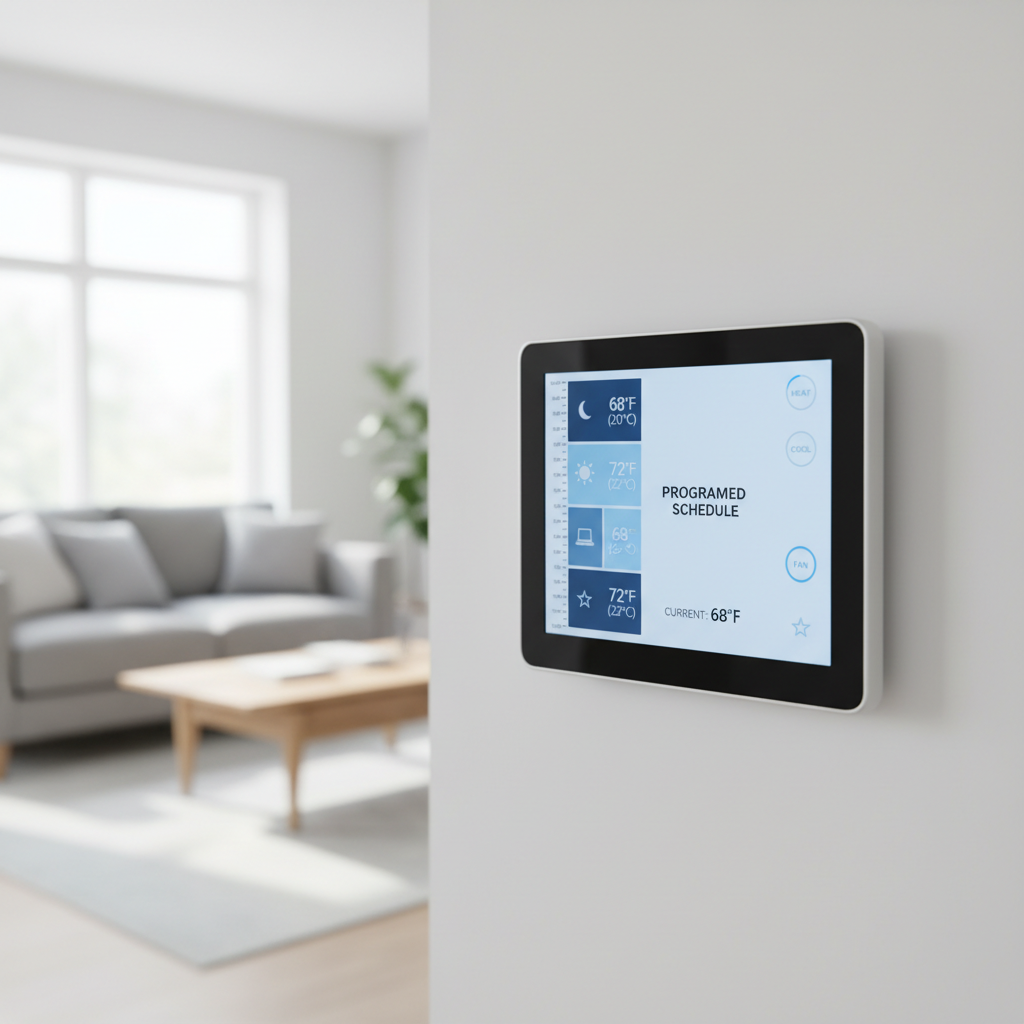
- Understand Your Utility's Time-of-Use Plan – Identify your specific peak and off-peak hours and rates.
- Check your latest electricity bill for details on TOU rates or visit your utility provider's website. Look for a section explaining different rate plans. Some utilities require you to opt-in to a TOU plan, so confirm your enrollment status.
- Note down the exact start and end times for peak, off-peak, and sometimes shoulder (mid-priced) rates, as these vary widely.
HVAC · High energy usage
| Project category | HVAC |
|---|---|
| Problem type | High energy usage |
| Trade required | HVAC |
| Urgency | Planned project |
| Safety risk | Low safety risk |
| DIY suitability | DIY for experienced homeowners |
| Cost category | High cost |
| Typical timeline | Assessment within weeks; replacement planned off-season |
| Contractor type | Licensed HVAC technician |
Repair option
Duct sealing, insulation, and a tune-up before touching the equipment.
Replacement option
High-efficiency replacement sized by a load calculation, not a rule of thumb.
Common causes
- Aging, low-efficiency equipment
- Leaking ducts losing conditioned air
- Insufficient attic insulation
- Oversized system short-cycling
Relevant tools:project cost estimatorrepair or replace
Published June 5, 2026Last updated August 17, 2026
Tools & materials you'll need
Affiliate links- AmazonProgrammable or smart thermostat1 · If upgrading from a basic manual thermostat.
- AmazonScrewdriver set1 · For installing a new thermostat, if needed.
- AmazonWire strippers1 · If a thermostat upgrade requires new wiring connections.
- AmazonSmartphone or computer1 · For smart thermostat app configuration or utility website access.
- AmazonYour electricity bill or utility website access1 · To identify your specific Time-of-Use rates and schedule.
As an Amazon Associate FixlyGuide earns from qualifying purchases — at no extra cost to you. Prices and availability are accurate as of publication and subject to change.
Quick Answer
Off-peak power refers to periods when electricity demand (and thus cost) is lowest, typically overnight or during specific windows on weekends. By programming your HVAC system to pre-cool your home during these cheaper hours and then maintaining that temperature during peak times, you can drastically reduce your energy consumption and lower your utility bills without sacrificing comfort.
The Problem
Many homeowners operate their air conditioning systems continuously throughout the day without considering the fluctuating cost of electricity. During peak demand hours, typically weekday afternoons when everyone returns home and turns on their AC, appliances, and electronics, utility companies charge significantly higher rates for electricity. This surge pricing can lead to unexpectedly high energy bills, especially during hot summer months when AC use is constant. The problem isn't just the amount of electricity you use, but when you use it. Running your AC at full blast during these expensive windows means you're paying a premium for every watt, leading to hundreds of dollars in wasted money annually.
How It Works
Utility companies use a pricing structure called Time-of-Use (TOU) or peak/off-peak rates to manage demand on the electrical grid. This system incentivizes consumers to shift their electricity usage away from periods of high demand to periods of lower demand. The concept is straightforward: when many people are using electricity simultaneously (peak hours), the cost per kilowatt-hour (kWh) goes up. When fewer people are using electricity (off-peak hours), the cost per kWh goes down. These peak and off-peak windows vary by utility company and region, but generally, peak hours fall on weekday afternoons and early evenings (e.g., 2 PM to 7 PM), while off-peak hours include nights, early mornings, and weekends.
The "hidden schedule" in your AC isn't a literal internal timer you don't know about, but rather the opportunity to program your smart or programmable thermostat to align with these utility-defined pricing schedules. The strategy involves "pre-cooling" your home during off-peak hours. For example, you might set your AC to cool your home to a lower-than-normal temperature (say, 70°F) during the pre-dawn hours when electricity is cheapest. Your home's thermal mass (walls, furniture, even the air itself) absorbs this coolness. Then, as peak rates begin, you might set your thermostat to a higher, but still comfortable, temperature (e.g., 74°F or 75°F). Because your home is already well-cooled, your AC won't need to run as frequently or as hard during the expensive peak hours, cycling on only intermittently to maintain the set temperature. This significantly reduces the amount of high-priced electricity your system consumes, leading to substantial savings without sacrificing comfort. Modern smart thermostats often integrate with utility data, making this process even more automated and efficient.
Step-by-Step Fix
-
Understand Your Utility's Time-of-Use Plan – Identify your specific peak and off-peak hours and rates.
- Check your latest electricity bill for details on TOU rates or visit your utility provider's website. Look for a section explaining different rate plans. Some utilities require you to opt-in to a TOU plan, so confirm your enrollment status.
- Note down the exact start and end times for peak, off-peak, and sometimes shoulder (mid-priced) rates, as these vary widely.
-
Evaluate Your Current Thermostat – Determine if your thermostat is programmable or smart-enabled.
- Most digital thermostats offer some level of programming. Smart thermostats (like Nest, Ecobee, or Honeywell Home) offer advanced features, including integration with utility rates and remote control.
- If you have an older, manual thermostat, consider upgrading to a programmable or smart model for maximum savings and convenience. A basic programmable thermostat can cost as little as $30, while smart thermostats range from $100-$300.
-
Create Your Pre-Cooling Strategy – Determine your ideal pre-cooling and maintenance temperatures.
- During overnight off-peak hours (e.g., 1 AM – 6 AM), set your thermostat 2-4 degrees Fahrenheit lower than your desired daytime temperature (e.g., if you want 74°F by day, pre-cool to 70°F or 72°F).
- For peak hours, set your thermostat to a comfortable, slightly higher temperature (e.g., 74°F – 76°F). Your pre-cooled home will help maintain this temperature with less AC runtime.
- Consider your daily schedule: program different settings for weekdays vs. weekends.
-
Program Your Thermostat – Input your pre-cooling and maintenance schedules.
- For Programmable Thermostats: Access the "schedule" or "program" settings. You'll typically set multiple time periods (e.g., Wake, Leave, Return, Sleep) and corresponding temperatures for each. Align these with your identified off-peak and peak hours.
- For Smart Thermostats: Use the thermostat's app. Many smart thermostats can automatically learn your schedule or integrate directly with your utility provider's TOU data, automatically adjusting settings for you. Look for "peak savings" or "time-of-use" features within the app.
-
Monitor and Adjust – Observe your comfort and energy bills, then fine-tune your settings.
- Pay attention to how well your home maintains temperature during peak hours. If it gets too warm, slightly lower your peak-hour setting or extend your pre-cooling period.
- Review your electricity bills closely. You should see a noticeable reduction in your total kWh cost, even if your overall kWh usage remains similar or slightly increases (due to pre-cooling, which costs less). Most utilities provide detailed usage breakdowns. Remember that changes might take a full billing cycle or two to become apparent.
Safety Note:
Never attempt to modify your HVAC unit's internal wiring or control board unless you are a qualified professional. Improper wiring can lead to electrical shock, fire, or permanent damage to your system. All thermostat installations should follow manufacturer instructions carefully, ensuring power is cut at the breaker before any wiring changes.
Common Causes
- Lack of Awareness of TOU Rates: Many homeowners are simply unaware that their electricity rates fluctuate throughout the day. Utility bills can be complex, and the details of TOU plans are often overlooked.
- Default Thermostat Settings: Most thermostats come with default programs that don't account for specific utility pricing schedules. Homeowners often just adjust the temperature manually without setting a consistent schedule.
- Set-It-and-Forget-It Mentality: Once the AC is running, it's easy to forget about optimizing its operation. Continuous manual adjustments are inconvenient, leading to inefficient use.
- Over-reliance on Manual Adjustments: Constantly turning the AC up and down based on immediate comfort needs, especially during peak hours, can actually increase costs compared to a well-planned, automated schedule.
- Underestimation of Pre-cooling Effectiveness: Some homeowners doubt the ability of their home's thermal mass to hold a cooler temperature, leading them to avoid pre-cooling strategies.
Common Mistakes
- Ignoring Your Utility's Specific TOU Schedule: Assuming all peak hours are the same can lead to programming that doesn't align with your provider's actual pricing, negating potential savings. Always verify your specific utility's schedule.
- Setting Pre-Cooling Temperatures Too Low: Dropping the temperature excessively during off-peak hours can lead to unnecessary energy consumption, even if the cost per kWh is lower. Aim for a 2-4°F drop, not 10°F.
- Not Considering Home Insulation: A poorly insulated home won't retain pre-cooling as effectively, requiring the AC to run more frequently during peak hours. Address insulation issues for better overall efficiency.
- Neglecting Thermostat Programming Features: Many programmable thermostats offer 7-day or 5+2-day programming. Failing to utilize these features means missing out on automated savings.
- Expecting Immediate Drastic Savings: While savings can be significant, they accumulate over time and depend on usage patterns and rate differences. Don't get discouraged if your first bill isn't halved; look for consistent, gradual reductions.
- Overlooking Smart Thermostat Integration: If you have a smart thermostat, ensure it's connected to your utility's programs (if available) for even greater automated optimization.
Cost & Time Breakdown
| Task | DIY cost | Pro cost | Time |
|---|---|---|---|
| Research utility rates | $0 | $0 | 15–30 min |
| Program existing thermostat | $0 | $0 | 15–30 min |
| Install new programmable therm. | $30–$100 | $100–$250 | 30–60 min |
| Install new smart thermostat | $100–$300 | $150–$350 | 30–90 min |
| Monitor & adjust | $0 | $0 | 15 min/month |
Tips & Prevention
- Regularly Check Utility Rates: Utility companies occasionally change their TOU schedules or rates. Make it a habit to check your provider's website or bill inserts once or twice a year to ensure your program is still optimized.
- Utilize "Away" Modes: If your programmable or smart thermostat has an "away" setting, use it when the house will be empty for several hours. This prevents unnecessary cooling during peak times when no one is home.
- Combine with Other Savings: Supplement your pre-cooling strategy with other energy-saving habits: keep blinds closed during sunny peak hours, use ceiling fans to feel cooler without lowering the thermostat, and ensure your HVAC filters are clean.
- Consider a Home Energy Audit: An energy auditor can identify areas where your home is losing cooled air, such as unsealed ducts or inadequate insulation. Addressing these will amplify your off-peak savings.
- Smart Thermostat Features: Maximize the potential of smart thermostats by linking them to external factors like weather forecasts or integrating them with your smartphone's location services to adjust temperatures automatically when you're approaching home.
- Proper System Maintenance: Ensure your HVAC system is serviced annually by a professional. A well-maintained unit runs more efficiently, translating to better performance during both peak and off-peak periods.
When to Call a Professional
If you're uncomfortable with electrical wiring during a thermostat upgrade, or if your HVAC system isn't adequately cooling your home even with optimized programming, it's time to call a professional. HVAC technicians can diagnose underlying system issues, ensure proper thermostat installation, and offer expert advice on optimizing your home's overall cooling efficiency, especially if your old system struggles to keep up. Do not attempt to work on major electrical components or refrigerants yourself.
Related Articles
Keep troubleshooting with these hand-picked guides from FixlyGuide:
- The Surprising Trick to Cutting Your Dryer Bill By $100 Per Year — Installing a clothesline can significantly reduce your energy bills and add a fresh scent to your laundry. This guide covers how to choose…
- The Secret Window AC Trick That Slashes Your Summer Electric Bill By 30% — Mastering simple window AC maintenance can significantly reduce your cooling costs and extend the life of your unit, often by more than 30%.
- The Secret to Lush Raised Beds? It's Not Just About How You Water — Smart irrigation for raised garden beds isn't just about automation; it's about delivering the right amount of water precisely when your pl…
- The Secret Power Tool Hiding in Your Garage for a Speedier Clean — Unlock the hidden potential of your cordless drill to tackle stubborn household grime, soap scum, and dirt with specialized cleaning attach…
- The Hidden Reason Your AC Isn't Cooling (And 7 Fixes Homeowners Miss) — If your central AC isn't cooling your home, the culprit often lies in an overlooked issue that's simple to fix, preventing costly professio…
- The #1 Reason Your Gutters Overflow (It's Not Clogging) — Discover the surprising true cause of overflowing gutters during heavy rain and how a simple fix can prevent costly water damage to your ho…
Should you do this yourself?
Answer five quick questions before you start. Safety outranks savings every time.
Your experience with work like this
How high do you have to work?
Does the job involve any of these?
Will it need a permit?
Specialty tools
Free and instant. Educational guidance only — not a quote, inspection, or professional diagnosis.
Estimate your own project cost
National averages are a starting point. Enter your details for a range that fits your house.
HVAC replacement cost
- Equipment$2,200 – $3,800
- Installation labor$1,200 – $2,500
Always insist on a Manual J load calculation — sq-ft sizing is only a rough check. Federal heat-pump rebates may reduce cost significantly.
Educational estimate only — always confirm with written local bids.
What should this project cost?
Enter your project details for a realistic cost range before you call anyone.
Service calls and common repairs run $150–$900; full system replacement typically $6,000–$12,000.
- Regional adjustment
- National average
- Labor share (typical)
- ~$1,935
- Quotes to collect
- 3 written estimates
Educational estimate based on national averages — not a binding quote. Always confirm with written local estimates.
Fixly Project Decision Box
- DIY difficulty
- Advanced
- Estimated time
- Homeowner checks 20–30 minutes
- Cost level
- Moderate
Main tools / materials
- Clean air filter
- Garden hose for condenser coils
- Shop vac for the condensate line
When to stop and call a pro
- Burning smell, smoke, or a tripping breaker
- Refrigerant lines iced over or hissing
- Any work inside the sealed refrigerant circuit (EPA-licensed only)
- Gas smell near a furnace — leave and call the utility
Need professional help?
Find an HVAC Pro Near YouBefore you start
Check the difficulty, permits, and safety risk — then decide whether to call a pro.
Free, no signup required. Estimates are educational guidance, not a quote or an inspection.
Get the print-ready PDF of this guide
A clean, ad-free, printable version you can keep on your phone or pin to the workshop wall. Free with a FixlyGuide account.
- Print-optimized layout
- Tools, materials & every step included
- Saved to your account
This article was independently written by FixlyGuide based on the source topic.
Frequently asked questions
What is off-peak power for HVAC?+
Off-peak power refers to specific periods, usually nights and weekends, when electricity demand is lowest and utility companies charge reduced rates per kilowatt-hour. By running your HVAC more during these times, you can save money.
How much can I save by using off-peak AC?+
Savings vary based on utility rates, your home's insulation, and your usage habits, but homeowners can typically reduce their monthly energy bills by 10-30% during peak cooling seasons by effectively utilizing off-peak strategies.
Do all utility companies offer off-peak rates?+
Not all utility companies universally offer time-of-use (TOU) or off-peak rate plans, though they are becoming more common. You'll need to check with your specific electricity provider to see if these programs are available in your area and if you need to opt-in.
What's the best thermostat for off-peak scheduling?+
Smart thermostats (like Nest, Ecobee, or Honeywell Home) are ideal because many can automatically integrate with utility TOU data, learn your schedule, and be controlled remotely, making off-peak optimization effortless. Programmable thermostats also work well if programmed manually.


Discussion
Loading comments…