- You are not completely comfortable or confident working with high-voltage electricity. Personal safety is paramount, and the potential for shock is real.
- You open the service panel and see burnt or melted wires, soot marks, or smell a strong acrid electrical odor. This indicates a serious electrical fault that requires professional diagnosis to prevent a fire.
- The circuit breaker trips immediately when you attempt to restore power after the repair. This is a sign of a dead short in the system that a capacitor replacement won't fix.
- You lack a multimeter to confirm the old capacitor is faulty and you are not comfortable replacing a part based on symptoms alone.
HVAC · High energy usage
| Project category | HVAC |
|---|---|
| Problem type | High energy usage |
| Trade required | HVAC |
| Urgency | Planned project |
| Safety risk | Low safety risk |
| DIY suitability | DIY for experienced homeowners |
| Cost category | High cost |
| Typical timeline | Assessment within weeks; replacement planned off-season |
| Contractor type | Licensed HVAC technician |
Repair option
Duct sealing, insulation, and a tune-up before touching the equipment.
Replacement option
High-efficiency replacement sized by a load calculation, not a rule of thumb.
Common causes
- Aging, low-efficiency equipment
- Leaking ducts losing conditioned air
- Insufficient attic insulation
- Oversized system short-cycling
Relevant tools:project cost estimatorrepair or replace
Published April 27, 2026Last updated August 17, 2026
Tools & materials you'll need
Affiliate links- AmazonScrewdriver or Nut Driver SetN/A · To remove the service panel screws.
- AmazonNeedle-Nose Pliers1 · For safely handling and disconnecting wires.
- AmazonSafety Gloves1 pair · Heavy-duty electrical safety gloves are recommended.
- AmazonSafety Glasses1 pair · Eye protection is crucial.
- AmazonMultimeter with Capacitance (μF) Function1 · Essential for testing the old and new capacitor.
- AmazonInsulated Screwdriver or Resistor1 · For safely discharging the old capacitor.
- AmazonReplacement Dual-Run Capacitor1 · Must match exact microfarad (μF) and voltage (VAC) ratings of the original.
As an Amazon Associate FixlyGuide earns from qualifying purchases — at no extra cost to you. Prices and availability are accurate as of publication and subject to change.
How it works
Your outdoor air conditioning unit, the condenser, relies on two critical single-phase induction motors: the compressor and the condenser fan. Unlike some motors, these cannot start on their own when standard single-phase AC power is applied. They require a secondary electrical winding, the "start winding," to be energized out of phase with the main "run winding." This phase shift creates a rotating magnetic field, generating the initial torque needed to overcome inertia and spin the motor. This crucial task is performed by a run capacitor.
Most residential AC units use a dual-run capacitor. This is a single metal canister containing two separate capacitors that share a common electrical terminal. The component will have three terminals on top, labeled "C" for Common (where power enters), "HERM" for the Hermetically sealed compressor motor, and "FAN" for the condenser fan motor. When the thermostat signals for cooling, 240-volt power is routed through the capacitor. The capacitor stores and releases electrical energy, creating the necessary phase shift for both the compressor and fan motors. Once the motors are running, the capacitor remains in the circuit to improve motor efficiency and power factor. Over time, exposure to heat and voltage spikes degrades the dielectric material inside, reducing its ability to hold a charge. This capacity, measured in microfarads (MFD), falls below the motor's requirement, leaving it unable to start, often producing only a low hum.
Step-by-Step Fix
This procedure involves working with high-voltage components. Safety is not optional. If you are ever unsure, stop and call a professional.
- Tools needed: Insulated screwdriver (Phillips and flat-head), 5/16" or 1/4" nut driver or socket wrench, multimeter with capacitance setting (µF or MFD), needle-nose pliers, work gloves, safety glasses.
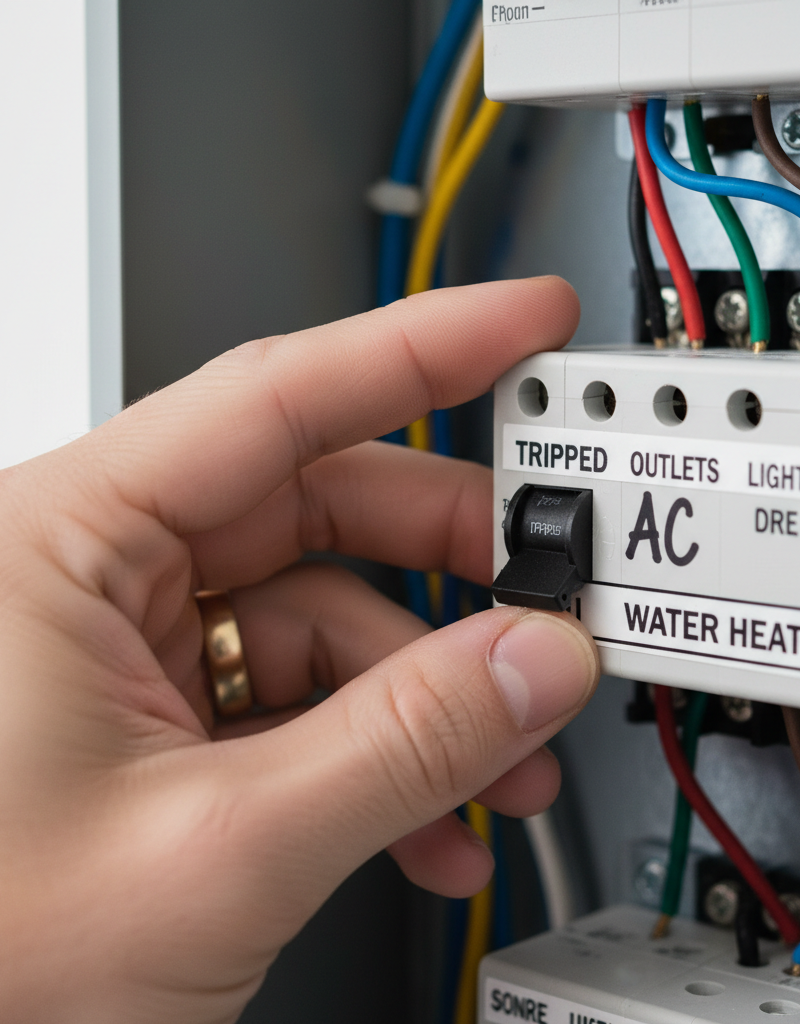
1. Disconnect All Power — This is the most critical safety step. Go to your thermostat and set the system to "Off." Next, locate the electrical disconnect box on the exterior wall near your outdoor AC unit. This is a small metal or plastic box. Open it and either pull out the T-handle disconnect or flip the breaker switch to the "Off" position. Finally, for absolute certainty, turn off the corresponding two-pole breaker for the "Air Conditioner" or "Condenser" in your main home electrical panel.
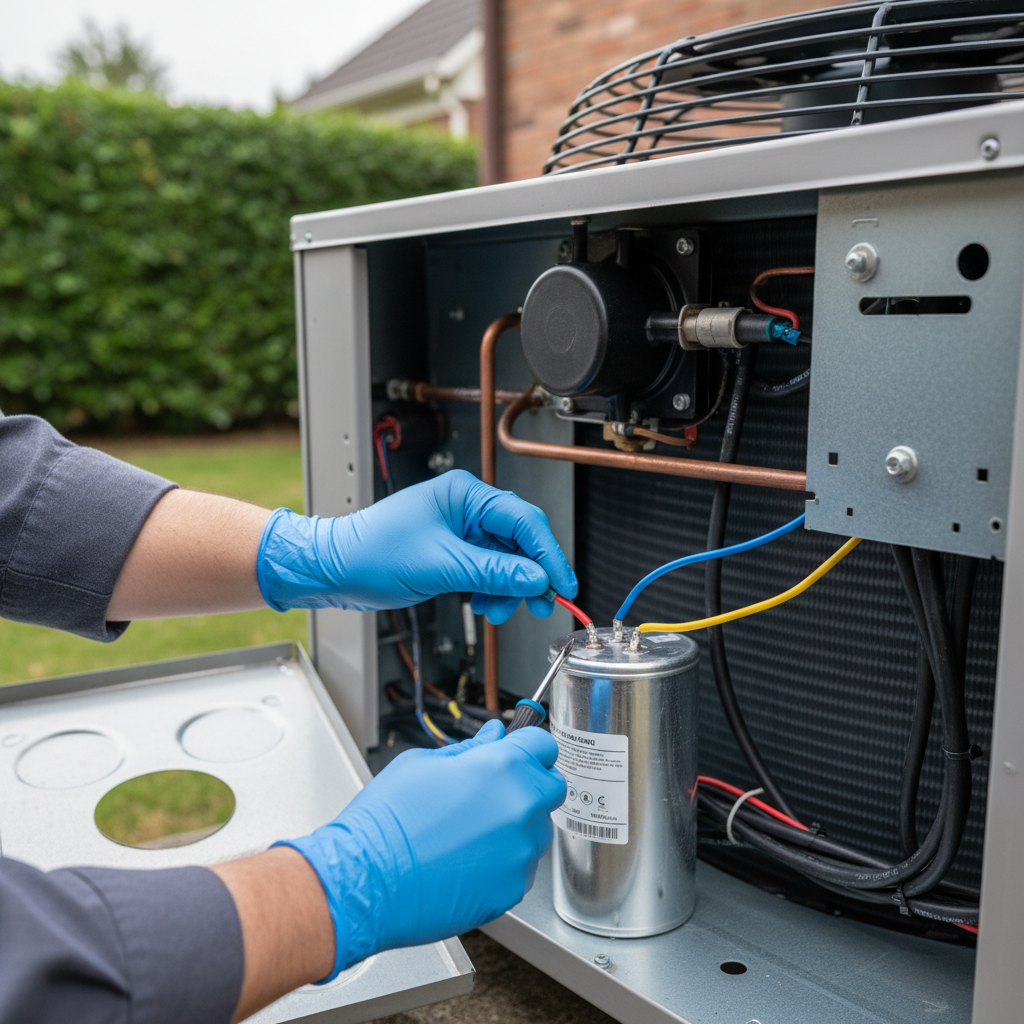
2. Access the Electrical Components — Expose the wiring and capacitor. On one corner of your outdoor unit, you will find a service panel, typically held on by several screws. Use your nut driver or screwdriver to remove the screws and carefully take off the panel. Set the panel and screws aside in a safe place. This will expose the contactor, wiring, and the capacitor.
3. Document the Wiring — Create your reassembly guide. The capacitor is a cylindrical metal can, usually silver, held in place by a metal strap. Before touching anything else, use your smartphone to take several clear, well-lit photos of the capacitor. Capture exactly which color wire connects to which terminal ("C," "HERM," "FAN"). Wire colors are not standardized; these photos and the terminal labels are your only reliable guide.
4. Confirm Capacitor Specifications — Identify the correct replacement part. Read the label on the side of the old capacitor. You are looking for two key ratings: the capacitance and the voltage. The capacitance will be listed as two numbers, such as "45+5 MFD" or "45/5 µF." The first, larger number is for the compressor (HERM), and the second, smaller number is for the fan (FAN). The voltage rating will be listed as 370VAC or 440VAC. * Your replacement capacitor must have the exact same MFD ratings (e.g., 45+5). * Your replacement capacitor's voltage rating must be the same or higher (e.g., you can safely replace a 370VAC model with a 440VAC model, but not the other way around).
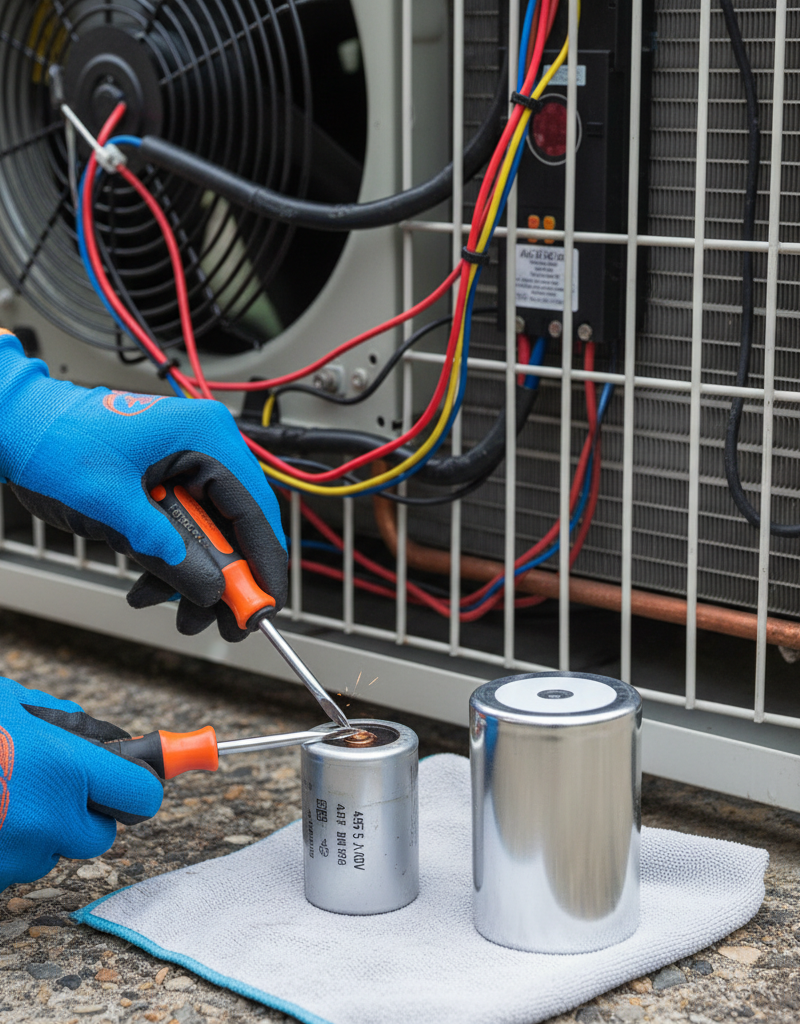
5. Safely Discharge the Capacitor — Eliminate the risk of shock. Even with the power off, a capacitor can hold a dangerous electrical charge. Put on your safety glasses and gloves. Hold an insulated screwdriver by its handle and use the metal shaft to bridge the "C" terminal to the "HERM" terminal for one second. Then, bridge the "C" terminal to the "FAN" terminal for one second. You may see a small, harmless spark and hear a pop; this is normal and indicates the capacitor was holding a charge. The capacitor is now safe to handle.
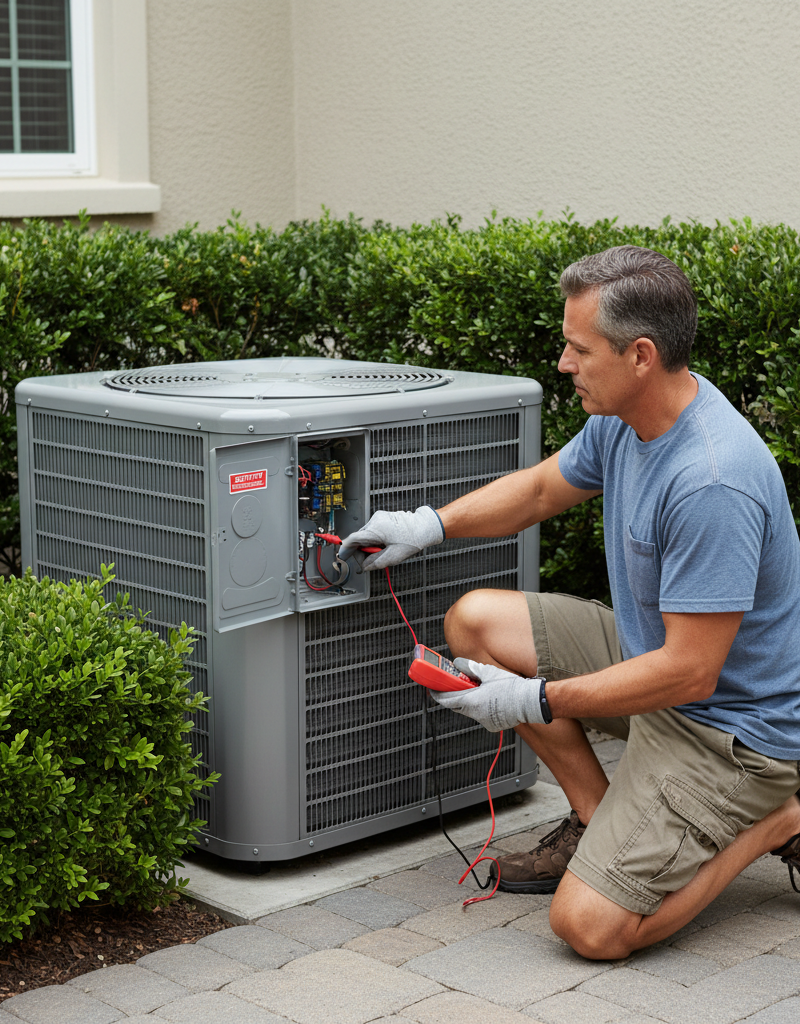
6. Test the Old Capacitor (Optional) — Verify the diagnosis. Set your multimeter to the capacitance setting (µF). Touch one probe to the "C" terminal and the other to the "HERM" terminal. The reading should be within +/- 6% of the first number printed on the can (e.g., for a 45 MFD rating, a good reading is 42.3-47.7). Next, touch one probe to "C" and the other to "FAN." This reading should be within +/- 6% of the second number. Any reading outside this tolerance, or a reading of "OL" (overload), confirms the capacitor is bad. A visibly bulging/swollen top or leaking oily fluid also confirms failure.
7. Purchase and Prepare the New Capacitor — Source the correct part. Take your old capacitor or the specifications you noted to an HVAC supply house or find an exact match online. Local supply houses can often test your old one for free. Before installing, inspect the new capacitor to ensure there is no damage from shipping.
8. Disconnect the Old and Connect the New — Swap the components. Loosen the screw on the metal strap holding the old capacitor. Referencing your photos, move the wires one at a time from the old capacitor to the exact same terminal on the new one. This one-by-one method minimizes the chance of error. For example, move the wire(s) from the old "C" terminal to the new "C" terminal, then do the same for "HERM" and "FAN." Once all wires are transferred, slide the old capacitor out and the new one in.
9. Secure the New Capacitor and Reassemble — Put the unit back together. Tighten the strap to hold the new capacitor firmly in place. It’s okay if the new part is a different physical diameter, as long as the strap can secure it so it doesn't vibrate against other components. Neatly tuck the wires back into the control area, ensuring they are not pinched or resting against sharp metal edges. Reinstall the service panel with its screws.
10. Restore Power and Test — Verify the repair. First, re-insert the disconnect pullout or flip the switch at the outdoor unit. Second, turn the AC breaker back on at the main electrical panel. Finally, go to your thermostat, set it to "Cool," and lower the temperature setting. Walk outside to the condenser unit. Within a minute or two, you should hear the compressor engage and see the fan spinning smoothly. Let it run for 10-15 minutes and check the indoor vents for cold air.
Common mistakes
-
Forgetting to Discharge the Capacitor: This is the most dangerous DIY mistake. A capacitor can hold a 400-volt charge, enough to cause serious injury. Always discharge it using an insulated screwdriver across the C-to-HERM and C-to-FAN terminals after all power is disconnected.
-
Buying the Wrong Part: Installing a capacitor with the wrong MFD rating will cause the motors to run inefficiently, overheat, and fail prematurely. Installing one with a lower voltage rating than the original (e.g., using a 370VAC to replace a 440VAC) creates a significant fire hazard and will lead to rapid failure of the new part.
-
Mixing Up the Terminal Wires: Connecting the fan wire to the compressor terminal or vice-versa will, at best, cause the unit to run improperly. At worst, it can instantly destroy the fan motor or the new capacitor. Always rely on clear photos of the original setup and the C, HERM, and FAN labels, not on wire colors.
-
Working with the Power On: Simply turning the thermostat to "Off" does not de-energize the outdoor unit. The contactor and capacitor terminals will still have 240 volts present. You must shut off power at the outdoor disconnect and the main circuit breaker to work safely.
-
Not Securing the New Capacitor: Leaving the new capacitor loose inside the control panel allows it to vibrate. This can chafe the wire insulation against the capacitor's metal casing or other components, creating a short circuit and a potential fire hazard. Always use the mounting strap.
Cost & time breakdown
This analysis assumes the faulty capacitor is the only issue. All costs are estimates and can vary by region and supplier.
| Task | DIY Cost | Pro Cost | Time |
|---|---|---|---|
| Safety Shutdown & Diagnosis | $0 (if you have tools) | $75 - $150 (trip fee) | 15-20 minutes |
| Sourcing Replacement Capacitor | $15 - $50 | (Included in part markup) | 30 minutes to 2 days |
| Capacitor Installation | $0 | (Included in labor) | 10-15 minutes |
| Reassembly & System Test | $0 | (Included in labor) | 5-10 minutes |
| Total Project | $15 - $50 | $150 - $450 | Under 1 Hour (active work) |
When to call a pro
While replacing a capacitor is a manageable DIY job, certain signs indicate a problem beyond its scope. You should stop and call a qualified HVAC technician if:
- You are not completely comfortable or confident working with high-voltage electricity. Personal safety is paramount, and the potential for shock is real.
- After correctly installing a new capacitor, the AC unit still exhibits the same problem (humming without starting, or tripping the breaker). This points to a more complex issue, such as a seized compressor, a failed fan motor, a bad contactor, or a faulty control board.
- You open the service panel and see burnt or melted wires, soot marks, or smell a strong acrid electrical odor. This indicates a serious electrical fault that requires professional diagnosis to prevent a fire.
- The circuit breaker trips immediately when you attempt to restore power after the repair. This is a sign of a dead short in the system that a capacitor replacement won't fix.
- You lack a multimeter to confirm the old capacitor is faulty and you are not comfortable replacing a part based on symptoms alone.
Prevention & maintenance
A capacitor is a consumable component, but you can extend its life and prevent an unexpected failure by following simple maintenance practices.
-
Annual Visual Inspection: Once a year, before the cooling season starts, shut down all power and inspect the capacitor. Look for any sign of swelling or bulging on its top surface. A healthy capacitor top is perfectly flat. Also check for any oily residue leaking from the terminals or casing. Bulging or leaking means the capacitor is failing and should be replaced immediately.
-
Keep Condenser Coils Clean: The large finned coils wrapping around your outdoor unit dissipate heat. When they are clogged with dirt, leaves, and grass clippings, the unit runs hotter and under more strain. This extra heat and electrical load significantly shortens capacitor life. Clean the coils each spring with a garden hose (spraying from the inside out) and a commercial coil cleaning foam.
-
Ensure Adequate Airflow: Do not plant shrubs or build structures within two feet of the outdoor unit. Unobstructed airflow is critical for efficient heat exchange. Overheating the unit is a primary cause of premature capacitor failure.
-
Proactive Replacement Schedule: The average run capacitor has a service life of 5-10 years. If your AC system is over 8 years old and still has the original capacitor, consider proactively replacing it. This small investment can prevent a system failure during a heatwave and the emergency service call that would follow.
-
Monitor System Startup: Pay attention to how your AC sounds when it kicks on. If you notice the startup sequence is becoming prolonged, or if you hear a new, louder humming sound before the fan and compressor engage, it can be an early warning sign of a weakening capacitor.
Related Articles
Keep troubleshooting with these hand-picked guides from FixlyGuide:
- The #1 Mistake Homeowners Make When Their AC Won't Turn On (And the Easy Fix) — Learn the most common reason your air conditioner won't turn on and how to diagnose and fix it with simple steps.
- The #1 Reason Your AC Blows Warm Air (And It's Not What You Think) — Discover the most common and often overlooked reason your AC might be blowing warm air, and how a simple capacitor fix can restore cool air.
- The $0 Trick to Revive Your Frozen AC Fan (Before You Call a Pro) — Before you spend money on an AC repair, try this simple, no-cost trick to get your condenser fan spinning again and cool your home.
- The Secret Culprit Behind Your AC Blowing Warm Air (It’s Not What You Think) — Discover the unexpected reason your air conditioner is blowing warm air and how a simple, often overlooked fix can restore your home’s cool…
- The $5 Part That Stops Your Dryer From Heating (And How to Replace It in 30 Min) — Discover the most common, inexpensive culprit behind a dryer not heating up and learn how to quickly diagnose and replace it yourself.
- Clogged AC Drain Line? Clear It Yourself in 30 Minutes — Learn how to quickly and safely clear a clogged AC drain line to restore your air conditioner's efficiency and prevent water damage.
Should you do this yourself?
Answer five quick questions before you start. Safety outranks savings every time.
Your experience with work like this
How high do you have to work?
Does the job involve any of these?
Will it need a permit?
Specialty tools
Free and instant. Educational guidance only — not a quote, inspection, or professional diagnosis.
Estimate your own project cost
National averages are a starting point. Enter your details for a range that fits your house.
HVAC replacement cost
- Equipment$2,200 – $3,800
- Installation labor$1,200 – $2,500
Always insist on a Manual J load calculation — sq-ft sizing is only a rough check. Federal heat-pump rebates may reduce cost significantly.
Educational estimate only — always confirm with written local bids.
What should this project cost?
Enter your project details for a realistic cost range before you call anyone.
Service calls and common repairs run $150–$900; full system replacement typically $6,000–$12,000.
- Regional adjustment
- National average
- Labor share (typical)
- ~$1,935
- Quotes to collect
- 3 written estimates
Educational estimate based on national averages — not a binding quote. Always confirm with written local estimates.
Fixly Project Decision Box
- DIY difficulty
- Advanced
- Estimated time
- Homeowner checks 20–30 minutes
- Cost level
- Moderate
Main tools / materials
- Clean air filter
- Garden hose for condenser coils
- Shop vac for the condensate line
When to stop and call a pro
- Burning smell, smoke, or a tripping breaker
- Refrigerant lines iced over or hissing
- Any work inside the sealed refrigerant circuit (EPA-licensed only)
- Gas smell near a furnace — leave and call the utility
Need professional help?
Find an HVAC Pro Near YouBefore you start
Check the difficulty, permits, and safety risk — then decide whether to call a pro.
Free, no signup required. Estimates are educational guidance, not a quote or an inspection.
Frequently asked questions
How do I know if my AC capacitor is bad?+
Common signs of a bad AC capacitor include the outdoor unit humming but the fan not spinning, the AC blowing warm air, the unit not turning on at all, or a distinct clicking sound from the outdoor unit. Visual cues like a bulging or leaking capacitor are also strong indicators.
Can I replace an AC capacitor myself?+
Yes, replacing an AC capacitor is a common DIY repair, provided you take necessary safety precautions. It involves turning off power, safely discharging the old capacitor, disconnecting wires, and connecting a new capacitor with matching specifications. Always verify the ratings carefully.
What tools do I need to replace an AC capacitor?+
You will need a screwdriver (usually nut driver or Philips), needle-nose pliers, a multimeter with capacitance testing (μF) capability, and a resistor or insulated screwdriver with a rated handle for safely discharging the capacitor. Safety gloves and glasses are also recommended.
How long does an AC capacitor last?+
The lifespan of an AC capacitor typically ranges from 5 to 10 years, though many can fail sooner, especially in hot climates or units with frequent on/off cycles. Regular inspections for bulging or leaks can help identify a failing capacitor before it completely gives out.
Discussion
Loading comments…