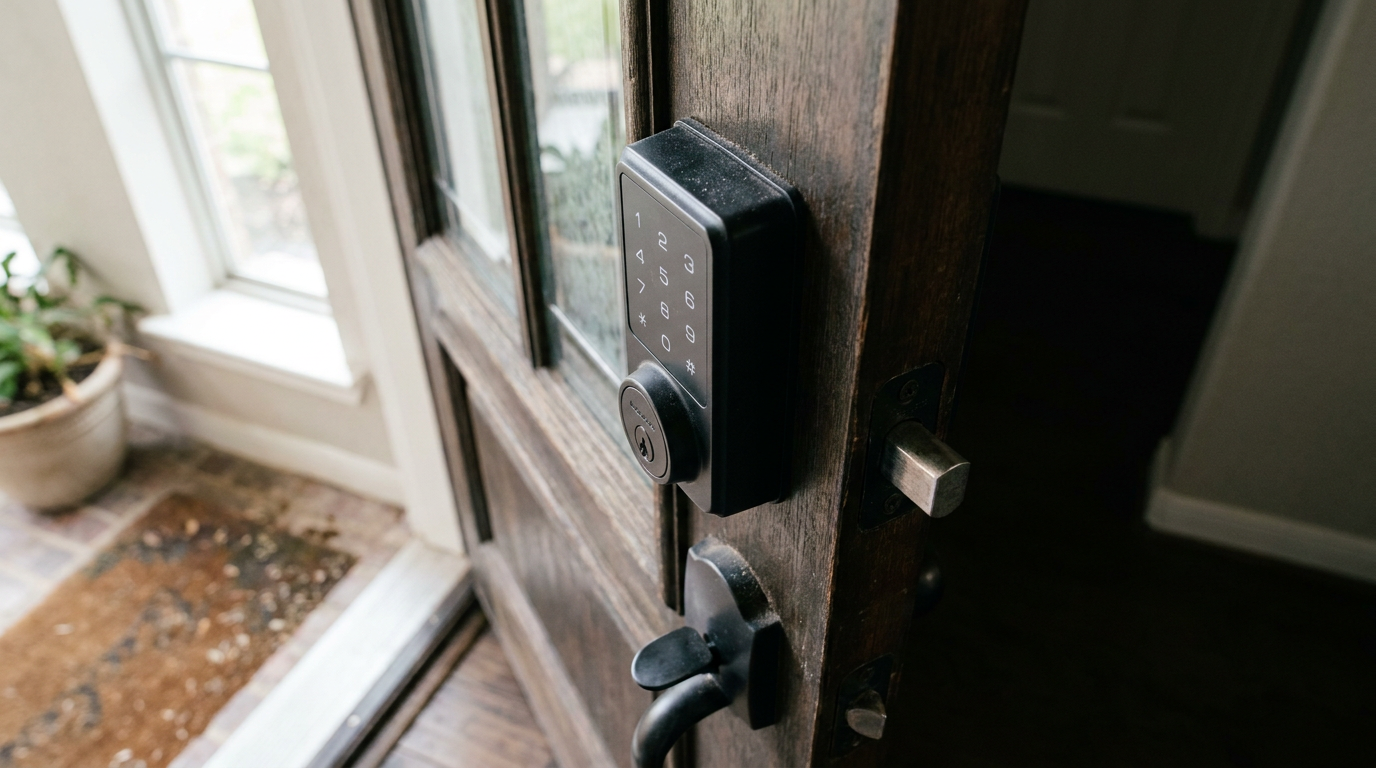
- Input: You enter your 4-8 digit code on the exterior keypad.
- Verification: A small circuit board (the "brain") inside the lock compares this code to the one stored in its memory.
- Activation: If the code is correct, the circuit board sends a signal—a small electrical pulse—to the motor.
General remodeling · Renovation planning
| Project category | General remodeling |
|---|---|
| Problem type | Renovation planning |
| Trade required | General contracting |
| Urgency | Planned project |
| Safety risk | Low safety risk |
| DIY suitability | Pro recommended |
| Cost category | Major investment |
| Typical timeline | Design and permitting often 2–4 months before work starts |
| Contractor type | General contractor |
Repair option
Phase the work and fix the building envelope first.
Replacement option
Full renovation with permits, design, and a general contractor.
Common causes
- Space no longer fits how the household lives
- Resale preparation
- Deferred maintenance stacking up
Relevant tools:project cost estimatorcompare quoteshome improvement material prices
Published October 5, 2026Last updated October 5, 2026
Tools & materials you'll need
Affiliate links- AmazonAA Alkaline Batteries4-pack
As an Amazon Associate FixlyGuide earns from qualifying purchases — at no extra cost to you. Prices and availability are accurate as of publication and subject to change.
Quick Answer
If your keypad lock isn't working, odds are the batteries are dead or too weak to do the job. I’d start there every time—swap in a fresh set of good alkaline batteries and see if the thing wakes up. If that doesn’t fix it, check for a bind, make sure the door’s lined up right, and try the backup key. Cold snaps and brutal heat can mess with battery output too, and they can make the lock’s little electronics act up.
The Problem
You punch in your code, hear a whir or a beep... but the deadbolt doesn't retract. Or worse, you get no response at all. Nice little convenience, right up until it turns into a headache and you’re standing there locked out of your own house. Then you start wondering if the lock’s shot, if you’re missing something simple, or if a locksmith bill is about to ruin your day. Most of the time, though, it’s something basic and fixable. You can usually sort it out yourself in a few minutes.
How It Works
A keypad deadbolt isn’t just a lock—it’s a mechanical setup with some electronics mixed in. Inside that housing, there’s a small motor whose whole job is to pull the deadbolt back. Here’s how it goes:
- Input: You enter your 4-8 digit code on the exterior keypad.
- Verification: A small circuit board (the "brain") inside the lock compares this code to the one stored in its memory.
- Activation: If the code is correct, the circuit board sends a signal—a small electrical pulse—to the motor.
- Action: The motor spins a tiny gear train. This gear assembly engages with the thumbturn mechanism on the interior side of the lock, rotating it just as you would with your hand. This rotation pulls the deadbolt from the door frame's strike plate and into the door.
Power for all that comes from a pack of AA batteries, usually tucked into a compartment on the inside housing. Once those batteries start to fade, the motor may not have enough juice to push through the friction of the deadbolt, even if the keypad still beeps like everything’s fine. And there’s a backup built in: a regular key cylinder that skips the electronics and lets you operate the lock by hand if the keypad’s acting goofy.
Step-by-Step Fix
Before you touch anything else, grab your backup key. That’s your safety net if this turns into a no-dice situation. Now let’s figure out what’s actually going on.
-
Bold Title: Test the Backup Key
- First thing I’d do is figure out if this is an electronic problem or a straight-up mechanical jam. Stick the physical key in the cylinder and try locking and unlocking the deadbolt. If the key turns easy and the bolt moves, you’re probably dealing with the keypad, batteries, or motor. If the key feels sticky too—or won’t move the bolt at all—you’ve likely got an alignment issue or a bind somewhere in the hardware.
-
Bold Title: Replace the Batteries
- This fixes 80% of keypad lock problems, no kidding. Open the battery compartment on the inside of the lock. Pull all the old batteries out—don’t leave one in there. Put in a full set of fresh, name-brand alkaline batteries. Lithium batteries can cause trouble on some models, so I wouldn’t gamble on those unless the manual says it’s fine. Don’t mix old and new batteries or different brands. While you’re in there, look at the contacts for corrosion—that white or greenish crusty stuff. If you spot it, clean it gently with a pencil eraser or a cotton swab dipped in vinegar.
- Safety: Don’t use rechargeable batteries unless the manufacturer says you can. Their voltage can bounce around and mess up the lock’s electronics.
-
Bold Title: Check the Keypad for Responsiveness
- With the new batteries installed, press a few numbers. Do they light up? Do you hear a beep with each press? If the pad’s dead flat—no lights, no sounds—you may have a disconnected wire between the keypad and the interior circuit board. If only some buttons work, the keypad itself might be worn out or wet inside. Also check whether "Lock" mode got turned on by accident. Some models shut the keypad off in that mode.
-
Bold Title: Clean the Keypad Surface
- Dirt, grime, and even leftover cleaning spray can interfere with the buttons. I’d use a microfiber cloth with a little isopropyl alcohol and wipe the keypad down good. Don’t spray cleaner straight onto the lock—that stuff can seep inside and trash the electronics. Make sure the numbers are clean and dry before you punch in the code again.
-
Bold Title: Inspect Door Alignment
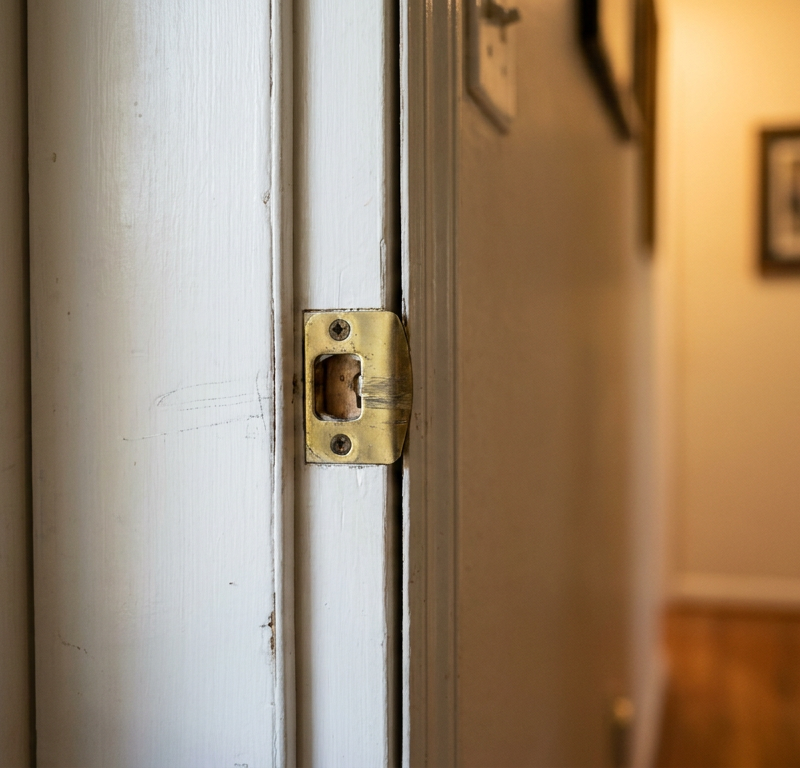
- Open the door and try your code again. If the lock works just fine with the door open but not when it’s shut, that tells you the deadbolt’s binding against the strike plate in the frame. Look for scrape marks on the bolt or the plate. A lot of times the door has sagged a bit. Tightening the hinge screws can help. If that doesn’t do it, you may need to move the strike plate. One common fix is to file the opening just a little bigger with a metal file so the bolt’s got more room.
-
Bold Title: Check the Wire Connections
- If the keypad still won’t respond with fresh batteries, you’ll need to check the wiring inside. Take off the interior housing from the door. You should see a small wire harness running from the exterior keypad assembly to the interior circuit board. Give that connection a gentle look and make sure it’s seated tight. Doors shake and slam all day, and that harness can wiggle loose over time. Unplug it and plug it back in firmly just to rule it out.
-
Bold Title: Reboot the Lock
- Same as any other electronic gadget, a keypad lock can get its software in a knot. A quick reboot sometimes clears the mess. Usually that means pulling the batteries, waiting about 60 seconds, then putting them back in. Some models want a specific reset routine from the manual, maybe pressing a certain button while power comes back on.
-
Bold Title: Test the Motor Manually
- With the interior housing still off and the door open, enter your code. You should be able to see the small motor try to turn the thumbturn mechanism. If you hear the motor humming but the bolt doesn’t move, there’s probably a stripped or broken gear in there. If you hear a click and no motor sound, the motor itself has likely given up.
- If this doesn't work: At this stage, I’d say the motor or the circuit board is the likely failure point. Those parts usually aren’t something you fix on the fly, and it’s time to think about a new lock or calling in a pro.
Common Causes
- Low or Dead Batteries: Biggest culprit, hands down. The motor needs full power to pull the bolt back.
- Poor Quality Batteries: Cheap, off-brand, or old batteries can act weird and die without warning.
- Extreme Temperatures: Both intense North Texas heat and surprise freezes can sap battery life and even cause the lock’s internal lubricants to thicken, making it harder for the motor to work.
- Door Misalignment: The house settling on our Texas clay soil can cause the door to sag, making the bolt bind in the frame.
- Jammed Bolt: Debris in the strike plate hole or a misaligned strike plate can physically block the bolt.
- Moisture Intrusion: Rain or even high humidity can get into the exterior keypad and corrode the electronics over time.
- Worn-Out Keypad: On older locks, the contacts on the most frequently used numbers (like 1, 2, 3, 4) can simply wear out.
- Failed Electronics: The internal circuit board or motor can fail, just like any other electronic component.
Common Mistakes
- Using Rechargeable Batteries: Most manufacturers warn against this. Their lower voltage (1.2V vs 1.5V for alkaline) can cause erratic behavior and low-battery warnings even when fully charged.
- Ignoring Low-Battery Warnings: That blinking light or series of beeps isn’t a suggestion. Once you get a warning, you might only have a dozen operations left before it dies completely.
- Slamming the Door: The repeated vibration can loosen the battery connections or the main wire harness inside the lock.
- Spraying Lubricants into the Keypad: Never spray WD-40 or other wet lubricants into the electronic parts. If the key cylinder is stiff, you can use a graphite lock lubricant, but keep it away from the keypad.
- Forgetting to Reprogram: If you perform a factory reset, your old codes won’t work. You must go through the reprogramming steps found in your lock’s manual.
- Painting Over the Lock: Paint can seep into the keypad, gum up the bolt, and ruin the lock. Always remove hardware before painting a door.
Cost & Time Breakdown
| Task | DIY Cost | Pro Cost | Time |
|---|---|---|---|
| Replace Batteries | $5–$15 | N/A | 2 minutes |
| Clean Keypad & Contacts | $0–$5 (for alcohol) | N/A | 5 minutes |
| Adjust Strike Plate | $0 (if you have a file) | $75–$150 | 15–30 minutes |
| Re-secure Internal Wires | $0 | $75–$125 | 10 minutes |
| Replace the Entire Lock | $100–$300+ | $200–$500+ | 30–60 minutes |
Tips & Prevention
- Schedule Battery Changes: Don’t wait for the warning. Change your keypad lock batteries once a year on a schedule, like when you change your smoke detector batteries.
- Use High-Quality Alkaline Batteries: It’s worth the extra few dollars for brands like Energizer or Duracell to keep things working right.
- Keep a Backup Key Accessible: Don’t hide the backup key inside the house you’re trying to get into. Give a copy to a trusted neighbor or keep one in a secure lockbox elsewhere on your property.
- Check Door Alignment Seasonally: As temperatures and humidity change, your door can swell or shrink. Check that the deadbolt operates smoothly every few months and adjust the strike plate as needed.
- Clean the Keypad Regularly: Wipe it down with a dry or slightly damp cloth to prevent grime from building up on the buttons.
When to Call a Professional
If you’ve changed the batteries, checked the wiring, and the lock still won’t work, stop there. Same goes if you hear the motor trying to run but the bolt won’t budge, or if the keypad’s totally dead even though it has power. That usually means the guts have failed. Digging deeper yourself can wreck the lock—or the door—and turn a small problem into a bigger one. A locksmith can pin down the issue, swap out the unit fast, and get it lined up right so you’re not stuck dealing with this again. I pulled a water heater in Frisco last month that had exactly this kind of “it should work, but it doesn’t” problem with a smart lock nearby—the batteries tested fine, but the door was hanging just enough to make the bolt bind. Happens all the time.
Related Articles
Keep troubleshooting with these hand-picked guides from FixlyGuide:
- Window Won't Stay Up? 3 Reasons Your Sash Falls (and the Real Fix) — Tired of a window sash that crashes down? We'll show you how to diagnose a broken window balance system—the hidden mechanism that holds the…
- The 3 Hidden Reasons Your Window Won't Stay Up (And the Easy Fixes) — Before you call a repairman, learn the three most common reasons your double-hung window won't stay open and how to fix them yourself.
- The 5-Minute Trick That Often Fixes a Dead Doorbell (No Electrician Needed) — Before you call an electrician for a dead doorbell, learn the surprising common culprit homeowners overlook and how to fix it in minutes.
- Your Door Won't Latch? The 5-Minute Fix Nobody Talks About — Tired of a door that swings open? Learn the secret 5-minute fix for a door that won't latch. This simple adjustment to your strike plate ca…
- The 3 Hidden Reasons Your Interior Door Sticks (and The 15-Minute Fix) — Discover the surprisingly common reasons your interior door sticks and learn how to fix it in under 15 minutes with simple tools.
- Thermostat Won't Connect to Wi-Fi? 9 Reasons and What to Check First — A smart thermostat that can't connect to Wi-Fi is just a thermostat. Here are the 9 most common reasons yours keeps dropping offline and th…
Should you do this yourself?
Answer five quick questions before you start. Safety outranks savings every time.
Your experience with work like this
How high do you have to work?
Does the job involve any of these?
Will it need a permit?
Specialty tools
Free and instant. Educational guidance only — not a quote, inspection, or professional diagnosis.
What should this project cost?
Enter your project details for a realistic cost range before you call anyone.
Cost depends heavily on which system turns out to be the source.
- Regional adjustment
- National average
- Labor share (typical)
- ~$1,620
- Quotes to collect
- 3 written estimates
Educational estimate based on national averages — not a binding quote. Always confirm with written local estimates.
Get the print-ready PDF of this guide
A clean, ad-free, printable version you can keep on your phone or pin to the workshop wall. Free with a FixlyGuide account.
- Print-optimized layout
- Tools, materials & every step included
- Saved to your account
Recommended for DIYers & woodworkers
Sponsored
The Top 20 Tools for Workshops of Any Budget
No stationary machines or power tools required — plus 3 fundamental tools that can't be bought at any price.
Get the free guide
Ted's Woodworking — The #1 Woodworking Resource
Detailed instructions, dimensioned drawings, materials & cutting lists, and 3D schematics for every skill level.
See the plansSponsored: links above are affiliate links. FixlyGuide may earn a commission on qualifying purchases — at no extra cost to you.
Frequently asked questions
How often should I change the batteries in my keypad lock?+
As a rule of thumb, replace them once a year, even if they haven't failed. Most locks will give you a low-battery warning (a blinking light or beeping), but it's best to be proactive to avoid getting locked out.
Why does my keypad lock work when the door is open but not when it's closed?+
This is a classic sign of a door alignment issue. The deadbolt is binding against the strike plate in the door frame. You may need to tighten your door's hinge screws or file the strike plate opening slightly larger.
Can I use rechargeable batteries in my electronic deadbolt?+
It's strongly recommended not to, unless your lock's manual specifically says it's okay. Rechargeable batteries often have a lower voltage (1.2V) than standard alkalines (1.5V), which can cause the lock to function erratically or report a low battery prematurely.
What do I do if my keypad lock has no lights or sounds at all?+
First, install a fresh set of high-quality alkaline batteries. If it's still completely dead, the wire connecting the keypad to the interior assembly may have come loose. If reseating that connection doesn't work, the circuit board has likely failed.
My keypad beeps, but the bolt won't turn. What's wrong?+
This usually means the lock has power, but the motor can't get the job done. The most common reason is that the batteries are too weak to power the motor, even if they can make the keypad beep. If new batteries don't fix it, the motor itself may be burned out or a gear may be stripped.
Will a factory reset fix my keypad lock?+
A factory reset can solve software glitches, but it will also erase all of your user codes. It should be used as a last resort. It won't fix hardware issues like a dead motor, a misaligned door, or dead batteries.
Can extreme cold or heat affect my keypad lock?+
Yes, absolutely. Extreme cold is especially hard on alkaline batteries, drastically reducing their output. Extreme heat can also shorten battery life and, in rare cases, affect the electronic components over the long term.
Is it safe to spray WD-40 on my keypad lock?+
Do not spray WD-40 or any other wet lubricant onto the keypad or electronic components. It can attract dust and gum up the electronics. If the separate, mechanical key cylinder is stiff, you can use a dry graphite lubricant, but apply it carefully.
Discussion
Loading comments…