
- Temperature Sensor Test — Usual suspect.
- Tools: Phillips screwdriver, multimeter.
- If this doesn't work: It could still be failing intermittently, or the problem might be somewhere else.
HVAC · High energy usage
| Project category | HVAC |
|---|---|
| Problem type | High energy usage |
| Trade required | HVAC |
| Urgency | Planned project |
| Safety risk | Low safety risk |
| DIY suitability | DIY for experienced homeowners |
| Cost category | High cost |
| Typical timeline | Assessment within weeks; replacement planned off-season |
| Contractor type | Licensed HVAC technician |
Repair option
Duct sealing, insulation, and a tune-up before touching the equipment.
Replacement option
High-efficiency replacement sized by a load calculation, not a rule of thumb.
Common causes
- Aging, low-efficiency equipment
- Leaking ducts losing conditioned air
- Insufficient attic insulation
- Oversized system short-cycling
Relevant tools:project cost estimatorrepair or replace
Published September 11, 2026Last updated October 25, 2026
Tools & materials you'll need
Affiliate linksAs an Amazon Associate FixlyGuide earns from qualifying purchases — at no extra cost to you. Prices and availability are accurate as of publication and subject to change.
Quick Answer
You just pulled out dinner, the oven's off, but that hum keeps going. Don't sweat it — most of the time, that's just the cooling fan doing its thing and getting rid of leftover heat so the electronics don't cook themselves. It’ll usually shut off on its own after about 10 to 20 minutes once the oven cools down. If it's still running for hours, or it never stops at all, then yeah, you've likely got a real issue with a sensor or the control board.
The Problem
You’ve made a solid meal, the kitchen smells good, the oven door's been closed for twenty minutes, and that fan is still whirring like it’s trying to lift off. Annoying as heck, right? It’s not just noise. If that cooling fan never shuts up, something’s off inside the appliance. Could be something small. Could be the start of a pricier repair if you let it ride. I’ve seen folks swear their oven was haunted because the fan wouldn’t quit. No dice. Let’s figure out what’s actually going on.
How It Works
Alright, let’s crack it open and talk about what’s happening inside. Most modern ovens, especially convection models and anything with electronic controls, have at least one fan, sometimes two. You’ve got your convection fan, usually inside the cooking cavity, and that one circulates hot air for even baking. That’s not usually the one you’re chasing after shutdown.
The real troublemaker is almost always the cooling fan — some folks call it a tangential fan or blower. This little guy isn’t there to help cook dinner. It’s there to protect the oven’s brain — the control board, wiring, and even the outer cabinet — from heat buildup. That matters a lot during self-cleaning cycles, where temps can hit upwards of 900°F. When the oven’s running, heat soaks into those components, and they need to stay under a safe range, usually below 150°F or so. The cooling fan pulls in cooler air, moves it through the compartment, and sends the hot air back out. Keeps things from getting toasted.
It’s usually kicked on by a thermostat or sensor watching the temperature around the control board, not the cooking temp in the cavity. Once that area cools off, the thermostat tells the fan to shut down. But if that sensor gets flaky, or the board gets confused, the fan just keeps spinning like it’s on the clock forever.
Step-by-Step Fix
Before you start pulling panels and poking around, shut the power off. Always. Unplug the oven or flip the breaker. Electricity doesn’t care how careful you think you are.
-
Check the Breaker First — Start simple.
- Head to your electrical panel and find the breaker for the oven. It’s usually a double-pole breaker, so it’s got two switches tied together, and it’s often rated 30 or 40 amps. Flip it off, wait 30 seconds, then flip it back on. Sometimes that resets the control board, same as rebooting a computer. If the fan comes right back on and keeps running even when the oven hasn’t been used, you’re past the easy stuff.
- Safety: Keep your hands dry any time you're working around the panel.
-
Listen to Your Oven — Figure out which fan’s talking.
- Before you start taking anything apart, listen closely and try to pinpoint which fan is running. Is it the convection fan inside the oven cavity? That one rarely runs nonstop after shutdown. Or is it the cooling fan, usually up top in the rear or down low in front, blowing air out? Knowing that saves a lot of guessing.
-
Temperature Sensor Test — Usual suspect.
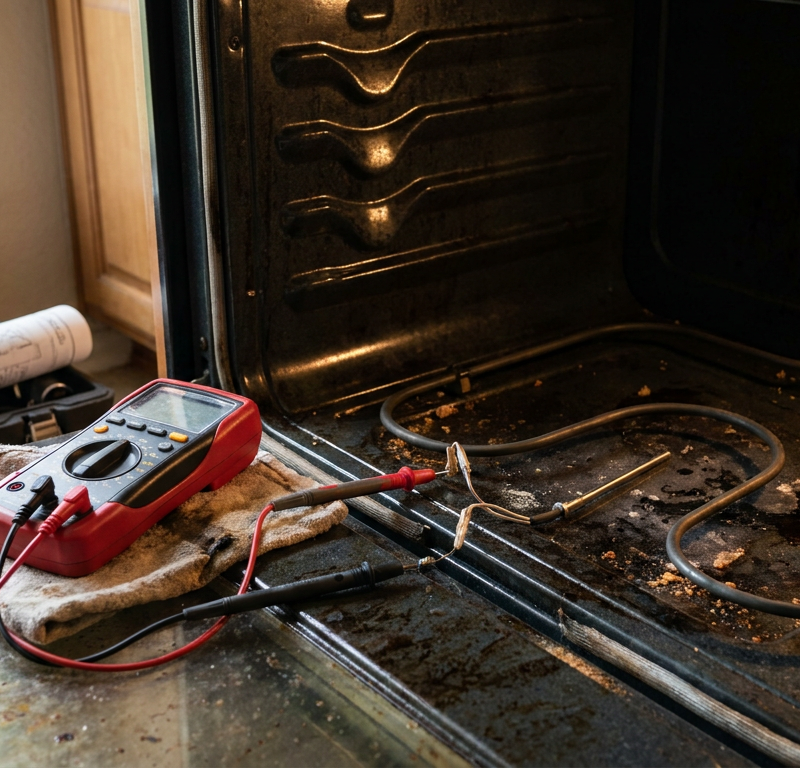
- The temperature sensor, often called the oven temperature sensor (OTS) or RTD probe, is usually a thin metal rod sticking into the oven cavity. It feeds temperature info back to the control board. If it’s bad, it can lie to the board and make it think the oven’s still blazing hot. Unplug the oven. Find the sensor; it’s usually held in with a couple screws. Disconnect it and check its resistance with a multimeter. A healthy sensor at room temperature (around 70°F) should read between 1080 and 1100 ohms. If it’s way above or below that, the sensor’s bad.
- Tools: Phillips screwdriver, multimeter.
- If this doesn't work: It could still be failing intermittently, or the problem might be somewhere else.
-
Inspect Wiring Connections — Loose wires can be sneaky.
- With the oven unplugged, carefully pull it out from the wall. Take off the back panel — you’ll probably need to remove several screws. Look for loose, corroded, or burnt wires, especially the ones tied to the temperature sensor, the cooling fan motor, and the main control board. A sloppy connection can make the whole thing act up. Give the connectors a gentle push and make sure they’re fully seated.
- Safety: Wear work gloves. Sharp sheet metal will bite you.
-
Test the Thermal Fuse/Cutoff — A safety part acting up.
- Some ovens have a thermal fuse or cutoff switch, especially on self-cleaning models, built to trip if things get dangerously hot. If that fuse is acting wrong, it can send a false overheat signal and keep the cooling fan running. Find it — usually near the control board or heating elements — and test it for continuity with a multimeter. A good fuse will show continuity. No continuity means it’s open and needs replacement. Not the first place I’d look, but it’s worth checking.
- Tools: Multimeter, nut driver.
-
Cooling Fan Motor Check — Could be the fan itself.
- It’s not the most common failure, but the cooling fan motor can go bad. With the oven unplugged, try spinning the fan blades by hand. They should move freely. If they’re stiff, noisy, or seized up, that motor might be toast. You’ll need to get to the motor, usually behind the rear panel or sometimes from underneath. Disconnect the wires and, if you’ve got the specs, test its resistance. Replacing it means taking out the mounting screws and swapping in the new one.
- Tools: Nut drivers, pliers.
- Pro Tip: Snap a picture of the wiring before you disconnect anything. Saves you from standing there scratching your head later.
-
Electronic Control Board (ECB) Inspection — The brain box.
- The control board is the nerve center. If the sensor, wiring, and fan motor all check out, this is where I’d start looking hard. With the power off, inspect the board for burnt spots, bulging capacitors, or damaged relays. Pay close attention to the relay that controls the cooling fan. Sometimes that relay sticks in the "on" position. If you see visible damage, the board’s probably done. That’s usually the priciest DIY part.
- Safety: Control boards don’t like static. Don’t go manhandling the board with bare hands if you can help it.
-
Test for Stuck Relays (Advanced) — For the brave ones.
- If you’re comfortable working around electronics, you can test the relays on the control board for continuity when they should be open. That means carefully removing the board and using a multimeter. For most homeowners, though, if the problem points to the board and there’s no obvious outside fault, replacing the board is usually the next move.
Common Causes
- Faulty Oven Temperature Sensor: This is the big one. If the sensor reads the internal temp wrong, it tells the control board the oven’s still hot, so the fan keeps running. Pretty common failure point. I had a GE oven, model JBP66, doing this exact thing for a client in Alpharetta a few years back. Swapped the sensor, problem solved in 15 minutes. Cost me about $40 for the part.
- Stuck Relay on the Control Board: The control board uses relays like switches. If the relay for the cooling fan gets stuck in the "on" position, the fan won’t shut off.
- Overheating Control Board: Sometimes the board itself gets too hot because airflow’s lousy or a component inside is failing. Then the cooling fan runs longer than it should trying to protect everything.
- Faulty Cooling Fan Thermostat: Some ovens have a separate thermostat just for the cooling fan, separate from the oven cavity sensor. If that thermostat fails, it won’t tell the fan to shut down.
- Wiring Issues: Loose connections or frayed wires can cause intermittent or constant fan operation, though that’s less common than sensor trouble.
Common Mistakes
- Ignoring the Problem: Folks think it’s "normal" for the fan to run for hours. Some ovens do run 20-30 minutes, sure. But if it’s going forever, something’s wrong and it can snowball into a bigger repair.
- Not Unplugging the Oven: Seriously — don’t fool around with live power. ALWAYS disconnect it at the wall or breaker before touching anything inside.
- Assuming it's the Convection Fan: A lot of homeowners blame the fan inside the oven cavity. That one can be involved, but the external cooling fan is usually the one running after shutdown.
- Buying Parts Without Testing: Don’t guess and buy a new sensor or board just because you’re frustrated. Test the parts first with a multimeter. You’ll save money and a pile of headaches.
- Forgetting to Document: Take pictures before you unplug wires. Trust me, you’ll be glad you did when it’s time to put everything back together.
- Calling a Pro Too Soon: This is fixable for a lot of handy homeowners. Don’t call in a pro before you’ve tried the basic stuff, especially the breaker reset and sensor test.
Cost & Time Breakdown
Here’s what you’re looking at for this kind of fix:
| Task | DIY Cost | Pro Cost | Time |
|---|---|---|---|
| Breaker Reset | $0 | $0 (if you call) | 1 minute |
| Temperature Sensor Replace | $30 – $80 | $150 – $300 | 15 – 30 min |
| Cooling Fan Motor Replace | $80 – $180 | $200 – $400 | 30 – 60 min |
| Control Board Replace | $150 – $350 | $300 – $600+ | 30 – 90 min |
| Wiring Repair | $5 – $20 | $100 – $250 | 15 – 45 min |
Tips & Prevention
- Regular Cleaning: Keep the area around your oven clean, especially the vents at the bottom or up top in the rear. Dust and junk kill airflow, and the cooling fan can’t do its job if it’s choking.
- Avoid Oven Overloading: Don’t pack the oven wall-to-wall. Good air circulation inside helps keep temps in check and takes some stress off the parts.
- Check Vents: Every so often, look at the cooling vents on the oven — usually under the control panel or at the back — and make sure spills or random objects aren’t blocking them.
- Listen for Changes: Pay attention to the normal sound of your oven. If the fan gets louder, starts grinding, or runs constantly, that’s your clue something’s off.
- Know Your Model: Keep the model number handy. Makes finding parts and troubleshooting info way easier.
- Don't Slam the Door: Not really about the fan, sure, but gentle handling helps the whole appliance last longer, including sensors and wiring.
When to Call a Professional
If you’ve worked through the steps and it still looks like the control board is the problem, or if you’re not comfortable poking around electrical components, call a professional appliance tech. Same goes if the oven’s throwing error codes, you smell burnt plastic, or you swapped the sensor and nothing changed. A good tech’s got the tools to track down tricky electrical faults without guessing, and that can save you from making a bad problem worse. I pulled a water heater in Frisco last month that had exactly this kind of nuisance issue — different appliance, same story: one bad part can make the whole thing act possessed. A pro can sort out control board problems or wiring headaches that are a little too hairy for most DIY folks, and that keeps you and the oven in one piece.
Related Articles
Keep troubleshooting with these hand-picked guides from FixlyGuide:
- Why Your Oven's Set Temperature Is a 50-Degree Lie — Your oven is likely off by 25-50°F, ruining your recipes; learn if it's a simple calibration issue you can fix in minutes or a faulty senso…
- The #1 Dryer Mistake That Adds Hours to Laundry Day (and Costs You Money) — Discover the most common, overlooked reason your dryer is taking too long to dry clothes and how a simple fix can save you time and energy.
- Is Your Refrigerator Buzzing Loudly in the Quiet of Night? — A loud buzzing from your fridge at night often points to the icemaker, a dirty fan, or a vibrating component, many of which are simple home…
- That Midnight Buzz: 5 Reasons Your Refrigerator Is So Loud — A refrigerator making a loud buzzing sound at night is often a sign of a struggling component, from a dirty condenser fan to an aging compr…
- Why Does Self-Clean Kill Your Oven? A $15 Fuse Is The Clue — Discover why your oven's self-cleaning cycle repeatedly trips the thermal fuse, leaving it dead, and learn the real cause beyond just the f…
- That Burning Dust Smell From Your Vents? Here's What It REALLY Means — Ever notice a burning dust smell from your vents when the heat kicks on? It's usually harmless dust burning off your furnace, but sometimes…
What should this project cost?
Enter your project details for a realistic cost range before you call anyone.
Cost depends heavily on which system turns out to be the source.
- Regional adjustment
- National average
- Labor share (typical)
- ~$1,620
- Quotes to collect
- 3 written estimates
Educational estimate based on national averages — not a binding quote. Always confirm with written local estimates.
Fixly Project Decision Box
- DIY difficulty
- Advanced
- Estimated time
- Homeowner checks 20–30 minutes
- Cost level
- Moderate
Main tools / materials
- Clean air filter
- Garden hose for condenser coils
- Shop vac for the condensate line
When to stop and call a pro
- Burning smell, smoke, or a tripping breaker
- Refrigerant lines iced over or hissing
- Any work inside the sealed refrigerant circuit (EPA-licensed only)
- Gas smell near a furnace — leave and call the utility
Need professional help?
Find an HVAC Pro Near YouGet the print-ready PDF of this guide
A clean, ad-free, printable version you can keep on your phone or pin to the workshop wall. Free with a FixlyGuide account.
- Print-optimized layout
- Tools, materials & every step included
- Saved to your account
Frequently asked questions
How long should an oven cooling fan run after the oven is off?+
Typically, an oven cooling fan should run for about 10-20 minutes after the oven is turned off. Its purpose is to cool down the internal components and electronic control board. If it runs significantly longer, or indefinitely, it indicates a problem.
What parts could cause an oven fan to run continuously?+
The most common culprits are a faulty oven temperature sensor, a stuck relay on the electronic control board, or sometimes a separate cooling fan thermostat. Less frequently, it could be the fan motor itself or wiring issues.
Can I just unplug the oven if the fan won't stop?+
Yes, you can unplug the oven or flip its dedicated circuit breaker to stop the fan. This is a good first step to try and reset the control board. However, if the fan immediately resumes running after power is restored, you'll need to investigate further.
Is it dangerous if my oven fan keeps running?+
While usually not immediately dangerous, a continuously running fan can indicate underlying issues that could shorten the life of your oven's components, especially the control board. It can also slightly increase your electricity bill over time. Address the issue to prevent more significant problems.
How do I test the oven temperature sensor?+
First, unplug the oven. Locate the sensor inside the oven cavity, usually held by two screws. Disconnect it and use a multimeter to check its resistance. At room temperature (around 70°F), a healthy sensor should read approximately 1080 to 1100 ohms. A reading outside this range suggests it's faulty.
What's the difference between a convection fan and a cooling fan?+
The convection fan is inside the oven cavity and circulates hot air for even cooking. The cooling fan (or tangential fan) is usually located outside the cooking cavity and protects the electronic components and external surfaces from overheating, especially when the oven is off.
Can I replace the oven control board myself?+
Replacing an oven control board is a moderately difficult DIY task. It involves unplugging the oven, accessing the control panel, carefully disconnecting and reconnecting wiring harnesses. Always take pictures before disconnecting anything, and ensure you have the correct replacement part for your model.
Will a constantly running oven fan increase my electricity bill?+
Yes, even a small cooling fan running 24/7 will consume electricity. While it's not a huge power draw, continuous operation adds up over time and will lead to a noticeable increase on your monthly utility bill.
What should I do if my oven smells burnt when the fan is running?+
If you smell anything burnt, immediately unplug the oven or turn off its breaker. A burnt smell suggests an electrical component is overheating or shorting out, which can be a fire hazard. Do not attempt to fix it yourself; call a qualified appliance technician right away.
Discussion
Loading comments…