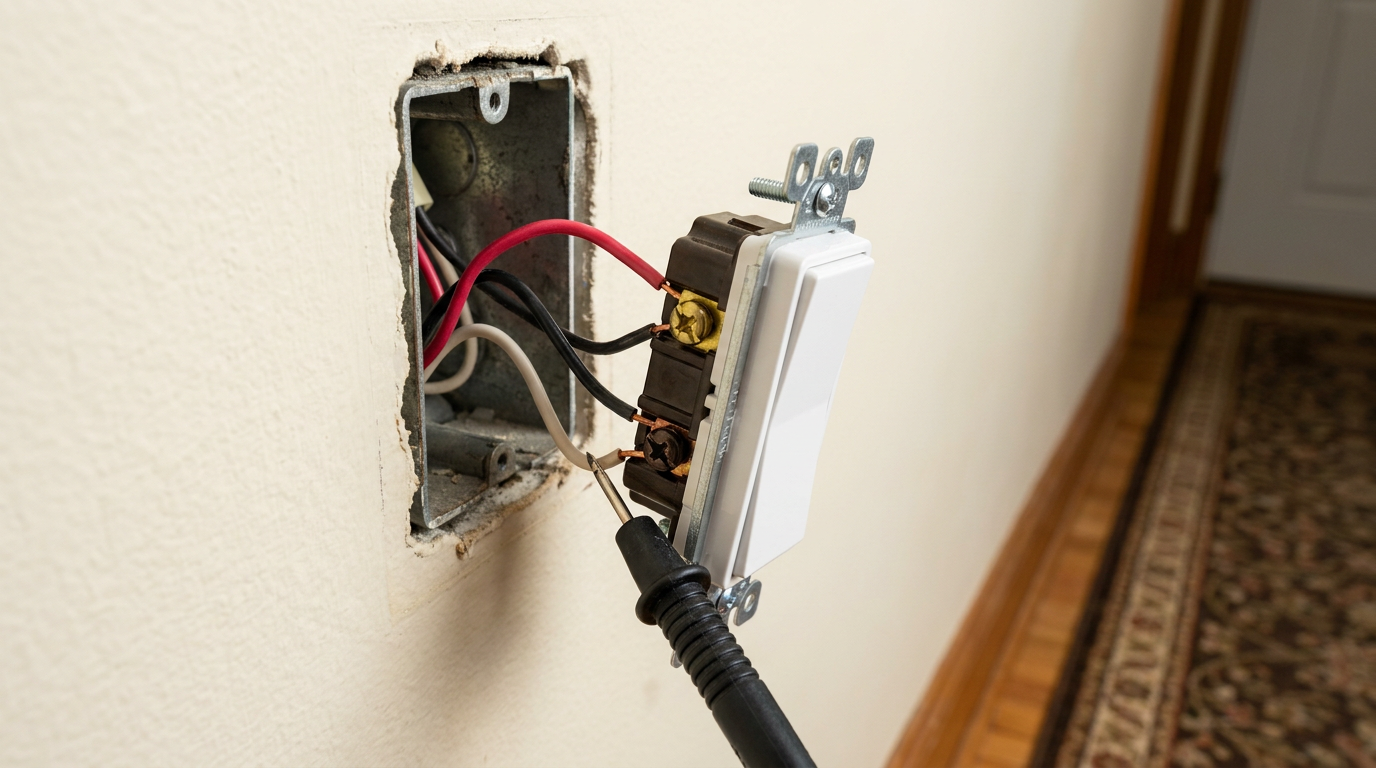
- Clamp the black negative multimeter probe to the bare copper equipment ground or the grounded metal junction box.
- Carefully touch the red positive probe to each insulated conductor tip one at a time.
- The single conductor showing a steady reading of approximately 115V to 123V AC is your incoming Line Hot. Mark this wire immediately with black electrical tape labeled "LINE COM".
Electrical · Panel or service upgrade
| Project category | Electrical |
|---|---|
| Problem type | Panel or service upgrade |
| Trade required | Electrical |
| Urgency | Planned project |
| Safety risk | High safety risk |
| DIY suitability | Licensed pro only |
| Cost category | High cost |
| Typical timeline | Permit plus utility scheduling, commonly 2–6 weeks |
| Contractor type | Licensed electrician |
Repair option
Add a subpanel when the main service is adequate.
Replacement option
Full service upgrade with utility coordination and permits.
Common causes
- Obsolete or recalled panel brands
- Service capacity too small for added loads
- No room for required AFCI/GFCI breakers
Relevant tools:project cost estimatorcompare quotes
Published October 21, 2026Last updated October 21, 2026
Tools & materials you'll need
Affiliate linksAs an Amazon Associate FixlyGuide earns from qualifying purchases — at no extra cost to you. Prices and availability are accurate as of publication and subject to change.
Quick Answer
A three-way switch quits working or acts backward when the line, load, and traveler wires get crossed during a swap or repair. I fix it by killing the breaker, using a digital multimeter to find the live line hot wire in the first box, and making sure both traveler wires land on the brass screws while the common wire goes on the black or dark bronze screw. Simple in theory. A little fussy in the box.
The Problem
You went to swap out a couple of tired almond toggle switches for clean modern paddles in the hallway or stairwell. You pulled the wires, hooked the new switches back up the same way—or so you thought—and now the lights act like they’ve got a mind of their own. Flip the downstairs switch and the light stays off unless the upstairs switch is in the "up" position. Or one switch only works part of the time, or the breaker trips the second you throw the handle.
Three-way switches cause a pile of homeowner wiring headaches. A regular single-pole switch is dead simple: one hot wire comes in, the switch opens or closes the contact, and the hot keeps on to the fixture. Three-way switches are different. They work as a pair. There’s no "ON" and "OFF" stamped on the toggle because either position can complete or break the circuit depending on what the other switch is doing.
Most of the time, the trouble comes from one classic mistake: mixing up the common screw and one of the traveler screws. And since switch makers don’t all put that dark common terminal in the same spot, eyeballing the old switch and copying it to the new one usually leads to no dice.
How It Works
A three-way circuit lets you control one or more lights from two spots using a pair of three-way switches tied together with a three-wire cable (usually 14/3 or 12/3 NM-B Romex with black, white, red, and bare copper). If you want to fix it without chasing your tail, you need a clean picture of how the current moves.
Each three-way switch has three active screw terminals plus a green ground screw. One terminal is a different color—usually dark black, charcoal, or dark bronze—and that’s the Common (COM). The other two active terminals are brass or copper-colored. Those are the Traveler terminals.
[120V Line from Panel]
         │
         ▼
[Switch 1: Common Terminal]
         │
     ┌───┴───┐
     │ Switch│ (Internal mechanical toggle directs current
     └───┬───┘  to Traveler A or Traveler B)
   Traveler A (Red)       Traveler B (Black)
     │                          │
     └───────────┬──────────────┘
                 │
     ┌───────────┴───────────┐
     │ Switch 2: Travelers   │
     └───────────┬───────────┘
                 │
      [Switch 2: Common Terminal]
                 │
                 ▼
          [To Light Fixture] ───> [Neutral return back to panel]
Current leaves the main service panel at 120 volts on a 14 AWG or 12 AWG hot wire. In Switch Box A, that incoming line hot connects to the Common terminal on the first switch. From there, two traveler wires—usually the red and black wires running through the wall—go over to the brass terminals on Switch Box B. When you flip Switch A, it reroutes the 120V current from Traveler 1 to Traveler 2.
At Switch Box B, those two traveler wires land on the two brass traveler screws. The Common terminal on Switch B connects to the switch leg, also called the load wire, which carries power up to the light fixture. If both switches are lined up on the same active traveler, the circuit closes and the light comes on. If either switch kicks the circuit over to the other traveler, the path breaks and the light goes dark. Hook the incoming line feed or the outgoing switch leg to a traveler screw by mistake, and now one switch starts bossing the other around—that thing’s toast.
I pulled a water heater in Frisco last month and found a three-way setup just like this behind a stairwell plate—every wire was “right” except the common was on brass. Took me longer to clean the drywall dust off my shirt than to fix the wiring.
Step-by-Step Fix
Follow this exact diagnostic and rewiring sequence to map, isolate, and correct the wiring mix-up.
-
Cut the circuit power at the service panel — Flip the dedicated 15-amp or 20-amp circuit breaker to the full OFF position before loosening a single screw. Verify zero voltage across all conductors in both switch boxes using a reliable non-contact voltage tester rated for 50–1000V AC.
- Tool required: Non-contact voltage tester (CAT IV).
- Safety check: Test the probe against a known live outlet first to confirm the tester's batteries and internal sensor are functioning.
-
Dismount both switch bodies from their electrical boxes — Remove the faceplates and back out the two 6-32 mounting screws holding each switch to its wall box. Pull the switches straight out by their metal mounting yokes so the insulated conductors extend out into the room with 2 to 3 inches of clearance.
- Crucial note: Leave all wires securely attached to both switches for now. Do not strip or pull wires off until you inspect the terminal markings.
-
Inspect and photograph terminal stamping — Inspect the molded plastic casing on the back of each switch with a flashlight to locate the embossed word "COMMON" or "COM". Compare this to the screw colors; the common screw is noticeably darker (dark bronze or matte black) compared to the twin brass traveler screws.
- Take crisp macro photos of both switches showing wire insulation colors against their respective terminal screws.
-
Label the traveler pair in both junction boxes — Identify the cable sheath entering the box that contains three insulated conductors (black, red, and white) alongside an uninsulated ground wire. The red and black wires from this specific 3-wire jacket are almost always your two traveler conductors.
- Wrap a small band of yellow electrical tape around the red wire and black traveler wire in both boxes to permanently mark them as the traveler pair.
-
Isolate and unhook the wires in Box A — Loosen the terminal screws or release the back-wire clamps on the switch in the box that houses the incoming power source. Bend the bare wire ends away from each other and the metal box sides so they hang cleanly in free air without touching any surface.
- If wires are brittle: Trim damaged tips with your wire strippers and carefully remove 5/8 inch of insulation to expose fresh, shiny copper.
-
Power the circuit to identify the continuous Line Hot — Clear children and pets from the room, leave the wires floating safely in free air, and turn the circuit breaker back ON. Set a digital multimeter to AC Volts (range of 200V or auto-ranging).
- Clamp the black negative multimeter probe to the bare copper equipment ground or the grounded metal junction box.
- Carefully touch the red positive probe to each insulated conductor tip one at a time.
- The single conductor showing a steady reading of approximately 115V to 123V AC is your incoming Line Hot. Mark this wire immediately with black electrical tape labeled "LINE COM".
-
Kill breaker power and secure Box A Common — Switch the breaker back to OFF and confirm zero voltage with your non-contact tester. Loosen the terminal screw labeled "COMMON" on your first three-way switch, bend the hook of your verified "LINE COM" wire clockwise around that dark screw, and torque it down snugly to approximately 12–14 in-lbs.
- Connect the two traveler wires (red and black from the 3-wire Romex) to the remaining two brass traveler screws. It does not matter which traveler wire goes to which brass screw.
- Connect the bare copper wire to the green grounding screw.
-
Identify the fixture load wire in Box B — Move to the second switch box. With the breaker still powered OFF, verify which single wire heads upward to the light fixture (this is typically the black wire exiting through a separate 2-wire cable containing only black, white, and ground).
- Diagnostic branch: If Box B contains multiple cables, check your neutral bundle. The white wire going to the light fixture will be wire-nutted directly into the white neutral bundle sitting deep inside the box. The black wire paired in that same 2-wire Romex is your Switch Leg (Load).
-
Terminate Switch B properly — Connect the identified Switch Leg (the black wire going directly to the light fixture) to the dark COMMON terminal screw on Switch B. Connect the two travelers (the red and black wire arriving from Switch A's 3-wire cable) to the two brass traveler screws.
- Fasten the bare ground conductor to the green screw on the mounting yoke.
- Inspect the white neutral wires pushed deep in the box; make sure their wire nut is tight and no bare neutral copper touches any switch terminal.
-
Fold conductors and remount switch yokes — Use an accordion-style fold (bending conductors back-and-forth like an accordion bellows) to guide the heavy 14 or 12 AWG wires smoothly into the rear cavity of the junction box. Drive the top and bottom 6-32 mounting screws until the yoke sits flush against the drywall or plaster plane.
- Avoid using a high-speed drill or impact driver on switch screws; excessive torque snaps plastic ears and strips box threads. Use a manual #2 Phillips or cabinet-tip flathead screwdriver.
-
Perform final operational switching test — Snap the wall plate covers into place and switch the circuit breaker ON. Conduct the four-state operational test:
- Switch A Up, Switch B Up: Light ON.
- Switch A Up, Switch B Down: Light OFF.
- Switch A Down, Switch B Down: Light ON.
- Switch A Down, Switch B Up: Light OFF.
- If the light responds instantly from either station regardless of the other switch's position, the circuit is fully mapped and correctly balanced.
Common Causes
- Swapping Common and Traveler screws during hardware upgrades: Modern decorator/paddle switches have terminal layouts that rarely match the shape of 30-year-old toggle switches. If you just move a wire from "top-left" on the old switch to "top-left" on the new one, you’ll attach a common wire to a traveler terminal 9 times out of 10.
- Using a switch loop without identifying the re-identified white traveler: In older wiring runs, electricians used a 2-wire Romex switch loop where a white wire carried hot current. If that white wire lands on the common terminal without black marking tape, the next guy figures it’s a neutral or swaps it with a traveler.
- Installing a single-pole switch in a three-way location: Single-pole switches only have two brass screws and an internal on/off gate. Put one in a three-way spot and you’ll leave a traveler dangling or capped, which kills the whole multi-switch setup.
- Loose back-stab connections releasing inside the box: Push-in rear spring terminals loosen up over time from heat and cooling. When a traveler wire loses contact in a back-stab hole, one path drops out and the second switch starts acting flaky.
- Smart switch companion wiring errors: A smart three-way master often needs an "add-on" or "companion" switch at the second location that talks by low-voltage signaling instead of line-voltage toggling. Feed 120V line power into a companion traveler terminal and you’ll either shut the whole circuit down or fry the logic board.
Common Mistakes
- Relying purely on insulation colors to assume wire functions: Black isn’t always "hot" and white isn’t always "neutral" in switch boxes. In three-way switch boxes, white wires can be used as travelers, if they’re re-identified with black tape or marker, or as hot feeds, and red wires are usually travelers or switch legs—never neutrals.
- Failing to photograph the original installation before unwiring: If you rip all three wires off an old switch before checking which one was on the black common screw, you’ve turned a 5-minute switch swap into a 45-minute multimeter tracing job.
- Using non-contact voltage wands for traveler diagnostics: Non-contact pens can pick up "phantom" or induced voltage on adjacent traveler conductors packed tight in the same Romex sheath. Use a real digital multimeter with low-impedance mode (LoZ) so you can tell actual line voltage from induced bleed.
- Over-stripping wire ends: If you expose more than 3/4 inch of bare copper, you leave live metal sticking out past the switch body. In a crowded metal box, that copper can touch the box wall or a bare ground wire and create a dead short.
- Forcing overstuffed junction boxes with mounting screws: If you use the switch mounting screws to smash rigid wires into a shallow 14-cubic-inch box, you can puncture insulation or crack the switch housing. Pre-fold the wires neatly with your thumbs before you set the switch against the box face.
Cost & Time Breakdown
| Task | DIY Cost | Pro Cost | Time |
|---|---|---|---|
| Diagnostic Line/Load Tracing | $0 (using existing multimeter) | $120–$190 (service call) | 20–30 mins |
| Replacing Pair of 3-Way Toggle Switches | $6–$14 (commercial-grade switches) | $150–$250 (parts + labor) | 30–45 mins |
| Upgrading to 3-Way Decorator Rocker Switches | $12–$24 (switches + wall plates) | $160–$275 (parts + labor) | 35–50 mins |
| Converting to Smart 3-Way Dimmer System | $45–$95 (master + companion switch) | $220–$350 (setup + commissioning) | 45–75 mins |
| Correcting Damaged Box Wiring / Junction Pigtails | $5 (wire nuts + 14 AWG jumper scrap) | $150–$225 (minimum bench fee) | 25–40 mins |
Tips & Prevention
- Photograph every box with flash before loosening screws: Capture terminal labels ("COM", "1", "2") and the wire insulation colors attached to them. That gives you a clean baseline if a traveler gets crossed.
- Flag the common wire with permanent black tape immediately: The second you pull the wall plate and identify the wire on the off-colored common screw, mark it with electrical tape or a marker before you remove it from the switch body.
- Standardize screw torque using screw terminals rather than push-in ports: Use the side screw terminals instead of the push-in "quickwire" or "back-stab" holes on the back of the switch. Form a clockwise "J" hook with wire strippers, seat it around the screw shank, and torque it to 12 in-lbs.
- Check wire gauge matching before purchasing parts: Verify whether your circuit runs on a 15-amp breaker with 14 AWG wire or a 20-amp breaker with 12 AWG wire. Switches need to match the circuit amperage rating; don’t put 14 AWG pigtails on a 20-amp circuit protected by a 20A breaker.
- Inspect box volume when adding thick smart switches: Smart switches take up almost twice the interior cubic volume of standard mechanical switches. In older, shallow steel boxes—especially in 1950s–1970s homes—make sure you’ve got enough cubic-inch box capacity so you’re not crushing conductors.
When to Call a Professional
Stop working and call a licensed electrical contractor right away if you find charred or melted wire insulation, discolored terminal screws, or signs of arcing in the wall box. If your home has aluminum branch circuit wiring installed between 1965 and 1973—marked by silver-colored wire conductors labeled "AL" or "ALUM" on the cable jacket—standard three-way switches from big-box stores will cause ugly oxidation and fire risks; that calls for specialized CO/ALR switches or professional Copalum/AlumiConn crimp terminations.
And if your voltage testing shows weird readings, like 40V to 80V bouncing around between neutral and hot lines, you’re probably dealing with an open neutral upstream, a bad ground path, or multi-wire branch circuit issues that need deeper diagnosis.
Frequently Asked Questions
Why does my three-way switch only work when the other switch is flipped up?
That’s the classic sign of a crossed common wire. One of the traveler wires has been put on the common terminal, and the real line hot or load switch leg has ended up on a brass traveler terminal. Current can only get to the second switch when the first one physically routes power into that one miswired traveler leg.
Does it matter which traveler wire goes to which brass screw?
No. The two brass traveler terminals on a three-way switch are interchangeable. Current passes through either Traveler A or Traveler B depending on the physical toggle position. As long as both traveler wires land on brass terminals and the single common wire lands on the dark common terminal, the switch pair will work just fine.
How do I tell which wire is the Common if I already disconnected everything?
Use a digital multimeter. Turn off the breaker, separate all bare copper ends so they hang untouched in the air, and restore power. The single wire in Box A that reads ~120V to ground is your Line Common. In Box B, the common wire is the conductor that runs directly to the light fixture, which you can verify with a continuity test once the circuit power is completely off.
Can I replace a three-way switch with a regular single-pole switch?
You can, but you’ll give up multi-point control for good. To convert a three-way circuit to a single-pole setup, you’ve got to figure out which traveler path you want to eliminate, splice the incoming power continuously through to the fixture leg at one box, and install the single-pole switch in the box that controls that direct path while capping the unused conductors with wire nuts.
Why does my breaker trip instantly when I flip the new three-way switch?
You’ve got a dead short wired into the switch. Most often, that happens when an ungrounded traveler wire gets clamped to a bare copper grounding screw, or when a white wire that was actually a neutral, not a traveler, gets tied to a switch terminal. The second the switch sends 120 volts into ground or neutral, the breaker pops.
What is the difference between a three-way switch and a four-way switch?
A three-way switch has three active terminals—one common and two travelers—plus a ground screw, and it controls a fixture from two separate locations. A four-way switch has four active terminals—two inputs and two outputs—with no common screw. It goes between two three-way switches so you can control the lights from three or more places.
Why is there a white wire connected to my three-way switch?
In standard residential wiring cable (14/3 or 12/3 Romex), the insulated wires are black, red, and white. Since three-way switching needs two travelers and one common, electricians often reuse the white conductor in that 3-wire run as a hot traveler. Under the National Electrical Code (NEC), that white wire should be re-identified with a band of black or red electrical tape to show it carries line voltage.
Why are my traveler screws different colors on different switch brands?
The common screw is almost always dark charcoal, bronze, or black, but traveler screw colors vary by manufacturer. Lutron, Leviton, and Eaton usually use bright brass for travelers, but some commercial-grade switches use light copper or silver-toned screws with stamped numbers ("1" and "2"). If there’s any doubt, trust the stamped markings ("COMMON" vs. travelers) over the screw color.
Related Articles
Keep troubleshooting with these hand-picked guides from FixlyGuide:
- Why One Room Has No Power (But the Breaker Isn't Tripped) — Discover why a whole room might suddenly lose power even when your circuit breaker stays stubbornly on, and learn how to safely troubleshoo…
- Outlet Sparks When Plugging In? 5 Causes and the Step-by-Step Fix — Learn why outlets spark, how to tell harmless micro-arcs from serious fire hazards, and the step-by-step method to safely test and replace…
- The Secret Reason Half Your Wall Outlet Dies (And It's Not What You Think) — Discover why only half of your electrical outlet might be working and how to diagnose and fix the common culprit, saving you from a costly…
- Why Your Outlet Died (Even If the Breaker's ON): The Hidden Causes Everyone Misses — Discover the surprising reasons why an electrical outlet might stop working even when the circuit breaker appears to be on, and learn how t…
- The Hidden Reason Your GFCI Won't Reset (And It's Not Always a Short) — Discover the often-overlooked culprits behind a GFCI outlet that refuses to reset and learn how to safely diagnose and fix the issue yourse…
- The Hidden Reason Your GFCI Trips (It's Not Always a Faulty Outlet) — A continuously tripping GFCI outlet is a critical safety warning, often indicating moisture, a faulty appliance, or a wiring problem that r…
Should you do this yourself?
Answer five quick questions before you start. Safety outranks savings every time.
Your experience with work like this
How high do you have to work?
Does the job involve any of these?
Will it need a permit?
Specialty tools
Free and instant. Educational guidance only — not a quote, inspection, or professional diagnosis.
What should this project cost?
Enter your project details for a realistic cost range before you call anyone.
Outlet and switch work usually $150–$400; panel upgrades commonly $1,800–$4,200.
- Regional adjustment
- National average
- Labor share (typical)
- ~$709
- Quotes to collect
- 3 written estimates
Educational estimate based on national averages — not a binding quote. Always confirm with written local estimates.
Fixly Project Decision Box
- DIY difficulty
- Professional Recommended
- Estimated time
- Diagnosis 1–2 hours
- Cost level
- Moderate
Main tools / materials
- Non-contact voltage tester
- Outlet tester
- Flashlight
When to stop and call a pro
- Burning smell, scorch marks, or a warm outlet or switch plate
- A breaker that trips again right after being reset
- Any work inside the service panel
- Aluminum wiring or cloth-insulated wiring
Need professional help?
Talk to a Licensed ElectricianGet the print-ready PDF of this guide
A clean, ad-free, printable version you can keep on your phone or pin to the workshop wall. Free with a FixlyGuide account.
- Print-optimized layout
- Tools, materials & every step included
- Saved to your account
Frequently asked questions
Why does my three-way switch only work when the other switch is flipped up?+
This is the classic symptom of a crossed common wire. One of the traveler wires has been landed on the common terminal, and the true line hot or load switch leg has been landed on a brass traveler terminal. Current can only reach the second switch when the first switch routes electricity into that single miswired traveler leg.
Does it matter which traveler wire goes to which brass screw?+
No. The two brass traveler terminals on a three-way switch are electrically interchangeable. Current passes through either Traveler A or Traveler B depending on the physical toggle position. As long as both travelers land on brass terminals and the common wire lands on the dark common screw, the circuit works.
How do I tell which wire is the Common if I already disconnected everything?+
Use a digital multimeter. Turn off the breaker, isolate all bare wire ends so they float in air, and turn the power back on. The single wire in Box A that reads ~120V to ground is your Line Common. In Box B, the common wire is the conductor that leads directly to the light fixture.
Can I replace a three-way switch with a regular single-pole switch?+
You can, but you will permanently lose two-point control. To convert to a single-pole setup, you must splice incoming power continuously through one box to feed the other, capping off unused traveler wires inside the wall boxes with approved wire nuts.
Why does my breaker trip instantly when I flip the new three-way switch?+
A direct short circuit has been wired into the switch. This happens when a traveler wire is mistakenly connected to the bare equipment ground screw, or a true neutral wire was connected to a traveler terminal. Flipping the switch connects 120V directly to ground, instantly tripping the breaker.
What is the difference between a three-way switch and a four-way switch?+
A three-way switch has three active terminals (one common, two travelers) and operates in pairs. A four-way switch has four active terminals (no common) and is positioned between two three-way switches to provide lighting control from three or more locations.
Why is there a white wire connected to my three-way switch?+
In standard 14/3 or 12/3 Romex cables, conductors are black, red, and white. Electricians routinely repurpose the white wire as a hot traveler. Under the National Electrical Code, this white wire should be marked with black electrical tape at both ends to warn that it carries live current.
Why are my traveler screws different colors on different switch brands?+
While the common screw is almost always dark bronze or black, traveler terminals vary by manufacturer. Lutron, Leviton, and Eaton typically use brass screws, but some use copper or stamped markings. Always rely on the embossed 'COMMON' label on the switch body rather than screw color alone.
Discussion
Loading comments…